
Tool To Speed Up Printify Product Creation: Bulk POD Product Creator

Introduction: why speed matters in Printify product creation
If you’ve ever tried to build a large catalog in Printify, you know how slow and repetitive it feels. Every single listing requires the same endless sequence of steps: pick the product, upload artwork, resize for each variant, write the title, draft a description, set tags, and assign prices. For one product, this can take 10–30 minutes. For hundreds of products, it turns into days—or even weeks—of grinding work.
The Bulk POD Product Creator eliminates that bottleneck. Instead of wasting hours manually creating listings one by one, you set up the operation in a few clicks and the tool generates a complete batch of print-on-demand products automatically. It’s faster, more consistent, and infinitely less soul-crushing than doing it by hand.
How the Bulk POD Product Creator speeds up product creation
Here’s the real power: every part of the manual Printify workflow has been automated. Let’s break down each step of the process and compare the traditional, manual way to the automated way.
Step 1: Choose your image files
Manual: Upload one file at a time in Printify’s interface. Wait for the upload. Repeat. Repeat again. If you’re working with 100 designs, you’ll upload 100 times, constantly waiting for files to finish before moving on.
Automated: Click Choose Files, select an entire folder of artwork, and you’re done. Each image instantly becomes the seed for a new product. Whether it’s 10 images or 500, the setup takes the same 10 seconds of effort.

Step 2: Select placement logic
Manual: Drag, drop, and resize artwork manually for each print area on every variant—t-shirts, canvases, posters, phone cases, you name it. Line it up. Zoom in. Move it 2 pixels to the left. Repeat across every size and color variant. If you make one mistake, you risk distorted designs or misaligned prints.
Automated: Pick a placement rule once—Stretch to Fit, Preserve Aspect Ratios & Center, or Exactly Match Example Image(s). The tool applies your chosen rule with pixel-perfect accuracy to every variant, every time. No errors. No fussy adjustments. Just consistent, professional placements automatically.
Step 3: Choose your example product
Manual: In Printify, you start from scratch for each new listing. Re-select variants, re-set pricing, and re-configure product settings every single time.
Automated: Select an existing example product from your Printify store as a blueprint. All variants, sizes, and settings are copied automatically to your new products. Instead of rebuilding from zero, every batch inherits a complete, proven configuration.

Step 4: Configure SEO content rules (titles, descriptions, tags)
Manual: Sit there and write. Title after title. Description after description. Tag after tag. For each image, you rack your brain: what does it depict? What keywords should I use? How do I describe the mood, the subject, the colors? Multiply that by hundreds of products, and you’ve got hours upon hours of dull, repetitive writing work.
Automated: Toggle Generate with AI and let the tool do it all. Titles can be simple or compound with optional custom suffixes. Descriptions can be one or two paragraphs with custom HTML appended. Tags can be capped at a set number and combined with evergreen terms like “poster,” “wall art,” or “print.” Behind the scenes, AI image recognition analyzes each artwork file and outputs highly accurate, SEO-optimized text. Instead of slogging through endless copywriting, you get search-friendly product data automatically.

Step 5: Click “Create My Products”
Manual: Hit publish, check the result, go back, repeat everything from the top for the next product. Hours evaporate.
Automated: One click. The Bulk POD Product Creator automatically generates all your print-on-demand products for you. Your catalog grows while you move on to higher-value work.
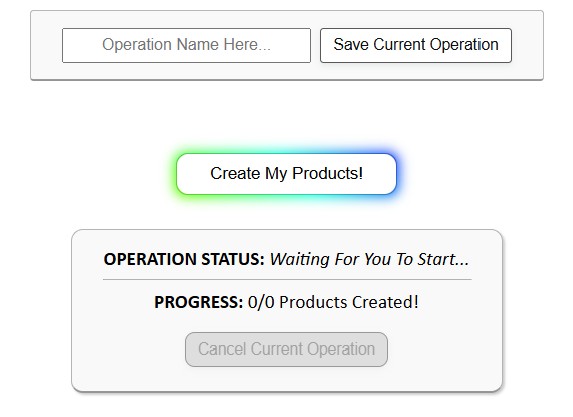
“God Mode” with Saved Operations
The Bulk POD Product Creator doesn’t just speed up one run—it saves your entire configuration for reuse:
- Save once, repeat forever. Every decision (store, example product, placement rule, AI settings, custom HTML, suffixes, tags) can be stored as a Saved Operation.
- Load in seconds. Next time, pick it from a dropdown, load, and all your settings are instantly applied.
- Minimal effort. Select your images, click create, and watch the products generate.
This is the ultimate time-saver. Instead of re-configuring dozens of options, you’re literally a few clicks away from producing hundreds of listings.

The time-savings contrast (manual vs. automated)
Let’s stack the two approaches side by side:
Manual workflow
- Upload one image at a time.
- Resize for each variant.
- Write every title, description, and tag from scratch.
- Reconfigure variants and prices for every product.
- Repeat this grind hundreds of times.
Automated workflow with the Bulk POD Product Creator
- Upload a folder of images.
- Select one example product.
- Choose a placement rule.
- Configure titles, descriptions, and tags (or reuse a Saved Operation).
- Click once. Batch creation begins.
What once required weeks of exhausting repetition can now be accomplished in minutes of setup and a single button click.
Bottom line: speed, scale, and sanity
The Bulk POD Product Creator is designed for sellers who value their time. Instead of drowning in endless manual tasks, you get a fast, reliable pipeline that builds Printify products at scale with almost no effort.
If your goal is to scale your catalog, grow your store, and spend less time on the boring grind, this time-saving Printify automation tool is the fastest, most efficient way to get there. Check out the Bulk POD Product Creator and experience the difference between manual drudgery and fully automated speed.