Printify SEO Automation Tool: Create Search-Optimized Products In Bulk
Overview: This post explains how the Bulk POD Product Creator automates the process of generating SEO-optimized Printify products in bulk, using AI to create unique titles, descriptions, and tags for every listing—helping sellers scale their catalog, maximize organic traffic, and eliminate manual work.

The Importance of Optimizing Your Printify POD Products for Search
In print-on-demand, traffic is everything. You could have the most stunning artwork in the world—but if no one finds your products, they don’t sell. That’s why search engine optimization (SEO) is the lifeblood of any successful POD business.
Every Printify product you publish becomes its own mini webpage—a potential entry point for customers searching on Google, Etsy, Shopify, or any integrated storefront. Each product’s title, description, and tags are what tell search engines what it is, who it’s for, and why it should rank for specific keyword searches.

When done manually, this is a painstaking process. You have to write every title by hand, think of keywords that match your artwork, craft descriptive paragraphs, and then tag each product with relevant phrases. Doing this for even 50 products can take days. Doing it for hundreds? Nearly impossible without automation.
And worse—humans inevitably fall into repetition. Titles start sounding alike, descriptions overlap, and keyword variety disappears. That means search engines see your listings as “duplicate” or “thin content,” and your rankings suffer.
That’s why automation isn’t just convenient—it’s essential. If you can automate the SEO layer of your Printify product creation, you can publish 100x more listings, each one uniquely optimized for search visibility.
More listings → more keyword coverage → more organic traffic → more sales.
That’s exactly what this Printify SEO automation tool was built to achieve.
Introducing the Printify SEO Automation Tool
The Bulk POD Product Creator is an intelligent, AI-powered software solution that automatically writes search-optimized product information for your entire Printify catalog.
Instead of manually typing titles, descriptions, and tags for each design, you simply upload your artwork images, configure your settings once, and let the tool do everything for you—automatically, in bulk.

Here’s how it works at a high level:
- It uses AI image recognition to analyze the content of each uploaded artwork image—identifying objects, subjects, colors, scenery, and artistic style.
- It then applies AI language generation to write keyword-rich titles, descriptions, and tags that accurately describe the image while incorporating relevant search terms.
- It repeats this process for every artwork image in your batch, automatically creating hundreds of SEO-optimized Printify listings in one operation.
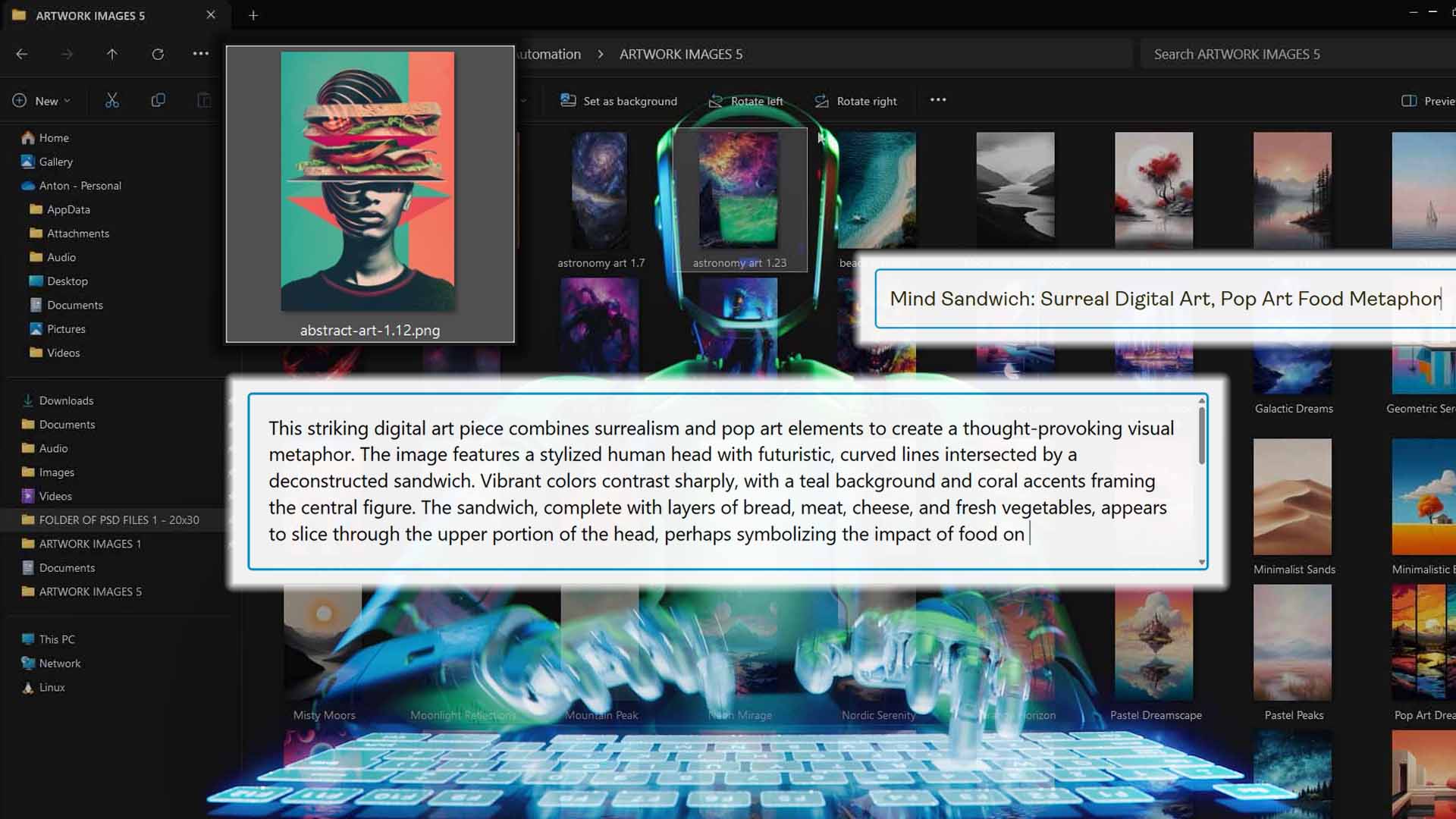
From an SEO standpoint, this is a massive breakthrough. Because each product gets its own AI-generated, artwork-specific metadata, no two listings are identical. That means your catalog covers a much wider range of long-tail keywords—capturing traffic from dozens (or hundreds) of different search queries you might never have thought of manually.
At a functional level, the tool acts as both a Printify automation engine and a search-optimization assistant. It doesn’t just upload products—it strategically positions them to perform better in search results.
For Printify sellers, this means:
- You spend less time writing, formatting, and editing.
- You produce more listings faster, each one uniquely optimized for SEO.
- You build an expansive catalog of high-quality, search-friendly products—automatically.
How To Set Up and Run Your Operations (Steps 1 & 2)
Before diving into the SEO generation step, you’ll first configure the basic setup for your operation. These first two steps establish the foundation—determining which products you’ll be optimizing and what visual rules the tool will follow when creating them.
Step 1 – Select Your Artwork Images and Placement Rules
Your first step is to choose the artwork images you want to turn into search-optimized Printify products. The software lets you select one or hundreds of images at once, and each one becomes its own unique product.

Once you’ve chosen your images, you’ll configure the image placement rule—this tells the software how to handle artwork positioning across different product variants. You can choose between:
- Stretch Images To Fit Print Area(s): Fills the print area completely, ideal for all-over prints and posters where full coverage is essential.
- Preserve Image Aspect Ratio & Center: Keeps your image’s proportions intact, perfect for photos or illustrations where visual integrity is important.
- Exactly Match Example Image(s): Copies the precise placement from your Example Product, ensuring pixel-perfect replication for standardized product lines.
From an SEO perspective, this step is more important than it looks. Clean, well-aligned product visuals directly influence engagement metrics—such as clickthrough rates, time on page, and bounce rates—all of which are SEO ranking signals. Poorly cropped or distorted visuals lower user trust and reduce the odds that your product ranks higher.
By standardizing image placement automatically, you’re setting up every product for strong visual presentation and higher perceived quality, which boosts the effectiveness of the AI-generated SEO text that follows.
Step 2 – Select Your Example Product and Store
Next, you’ll select your Printify store (if you manage multiple) and choose an Example Product from your existing Printify catalog.

Your Example Product serves as the blueprint for everything the tool creates. It defines:
- Which product type to duplicate (e.g., canvas print, hoodie, mug).
- Which variants to include (e.g., size, color, frame style).
- Which pricing settings to apply.
The automation tool then clones all those configuration details automatically for each artwork image you selected earlier. Every imported product will use the same base structure—same variants, same pricing, same print provider—but with its own AI-optimized SEO metadata generated uniquely for its image.
From an SEO perspective, this structure ensures perfect consistency at the technical level while maximizing differentiation at the content level. In other words:
- Uniform structure = professional, trustworthy storefront.
- Unique metadata = unique keyword reach.
Once Steps 1 and 2 are complete, you’ve set the groundwork for an SEO-optimized bulk-creation operation. The next phase—Step 3—is where the real magic happens: the automation of titles, descriptions, and tags via AI, which we’ll cover in the next section.
Step 3 – Automate Print-on-Demand SEO Titles, Descriptions, and Tags Using AI
This is where the Bulk POD Product Creator truly shines—the step that turns your uploaded images into fully search-optimized, revenue-producing products.
Once you’ve completed Steps 1 and 2, the system automatically passes each of your artwork images through its AI image recognition pipeline. This process identifies the objects, subjects, scene, and composition within each artwork image—effectively “understanding” what the image depicts.
Then, using large language models (LLMs) tuned for print-on-demand SEO, it automatically generates keyword-rich titles, descriptions, and tags tailored specifically to each product.
This means every single listing in your Printify store—even if you’re creating hundreds in one operation—gets its own unique metadata, optimized for search discoverability.
AI-Generated Product Titles
Titles are the first (and often most important) piece of metadata for both search engines and customers. A title needs to accurately describe the product and include the right combination of keywords to help it rank for relevant searches.
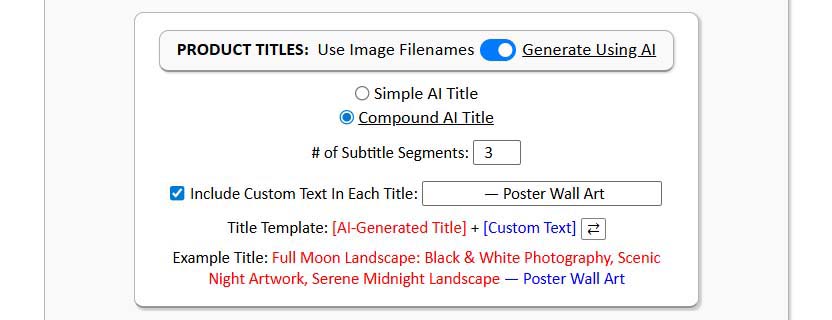
The tool automatically generates these titles using AI, giving you complete flexibility over the structure and style of the output.
You can choose between:
- Simple Titles: Concise, direct, artwork-specific titles that focus purely on describing the image content (e.g., “Sunset Over Desert Canyon”).
- Compound Titles: Longer, keyword-rich titles that include a user-defined number of subtitle segments—giving your product a wider long-tail keyword reach (e.g., “Sunset Over Desert Canyon: Landscape Artwork, Nature Photography, Orange Sky Horizon”).
You can also prepend or append custom text to all product titles—perfect for embedding product-level or category-level keywords. For example:
- “Vintage Botanical Illustration – Framed Canvas Print”
- “Abstract Geometric Artwork – Modern Wall Decor”
The AI titles strike a balance between human readability and algorithmic keyword optimization. They don’t feel spammy, but they’re packed with the right descriptive terms to help your products surface for both short- and long-tail search queries.

SEO Advantages:
- Unique, descriptive titles for every product, no duplication.
- Automatic keyword inclusion for a wider range of search terms.
- Increased clickthrough rates due to clean, relevant, and readable phrasing.
- Consistent formatting across your catalog for a professional storefront appearance.
AI-Generated Product Descriptions
Product descriptions are the backbone of on-page SEO. They help search engines understand the context of your listing, while also providing buyers with emotional and visual cues about the product.
Writing these manually is exhausting, but the automation tool does it automatically and precisely. Each image is analyzed by the AI for details like subject matter, lighting, texture, mood, and style. Based on that, the system generates long-form, artwork-specific product descriptions that sound natural, detailed, and keyword-rich.

You can configure:
- Length (short, medium, or long) depending on your SEO strategy.
- Custom HTML blocks to append at the end of every description (e.g., material info, size guides, brand messaging, etc.).
Each description integrates relevant terms naturally—from visual descriptors (“minimalist pastel landscape”) to product-level keywords (“poster wall art,” “canvas decor,” “boho room print”).

SEO Advantages:
- Increases keyword density in natural, readable ways.
- Helps your products rank for more long-tail search queries.
- Enhances user engagement metrics by providing richer, more useful content.
- Ensures every product page offers unique value to search engines.
The result: a fully fleshed-out, descriptive product catalog where every listing helps strengthen your site’s SEO foundation.
AI-Generated Product Tags
Tags may seem like a minor detail, but in the SEO ecosystem—especially on marketplaces like Etsy and Shopify—they play a critical role in helping search algorithms categorize and surface your products.
The automation tool generates tags automatically for each image, using the same AI recognition process that powers titles and descriptions. It identifies relevant themes, subjects, colors, and styles, then outputs diverse, high-precision tags tailored to that product.
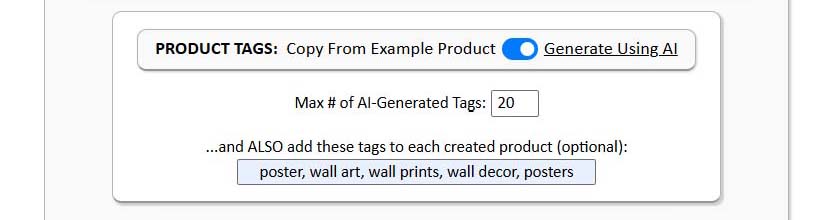
You can also define custom tags that get appended across all products (useful for branding or campaign tracking).
SEO Advantages:
- Expands your store’s reach by covering more keyword variations.
- Creates logical internal linkages between products for better search clustering.
- Reduces repetition—every product gets distinct, contextually relevant tags.
- Boosts on-platform discoverability (especially on Etsy or Shopify storefronts).
Together, these AI-powered metadata layers—titles, descriptions, and tags—give your Printify catalog a level of SEO optimization that’s nearly impossible to achieve manually at scale.
How This Tool Drives More Traffic to Your Store
Let’s connect the dots between the automated SEO features and the real-world results they generate: more traffic, more visitors, and more conversions.
Every Printify product created through this tool is a standalone web page. Each page has its own title tag, description, and URL, and each one can rank independently for relevant search queries. That means every time you run an operation, you’re not just adding products—you’re adding new indexed opportunities for organic discovery.
1. Every Product Targets New Keywords
Because AI analyzes each image individually, every product gets its own set of unique, artwork-specific keywords. This massively broadens your keyword footprint—you’re no longer competing for the same terms across multiple listings. Instead, you’re ranking for hundreds of different long-tail variations your audience is searching for.
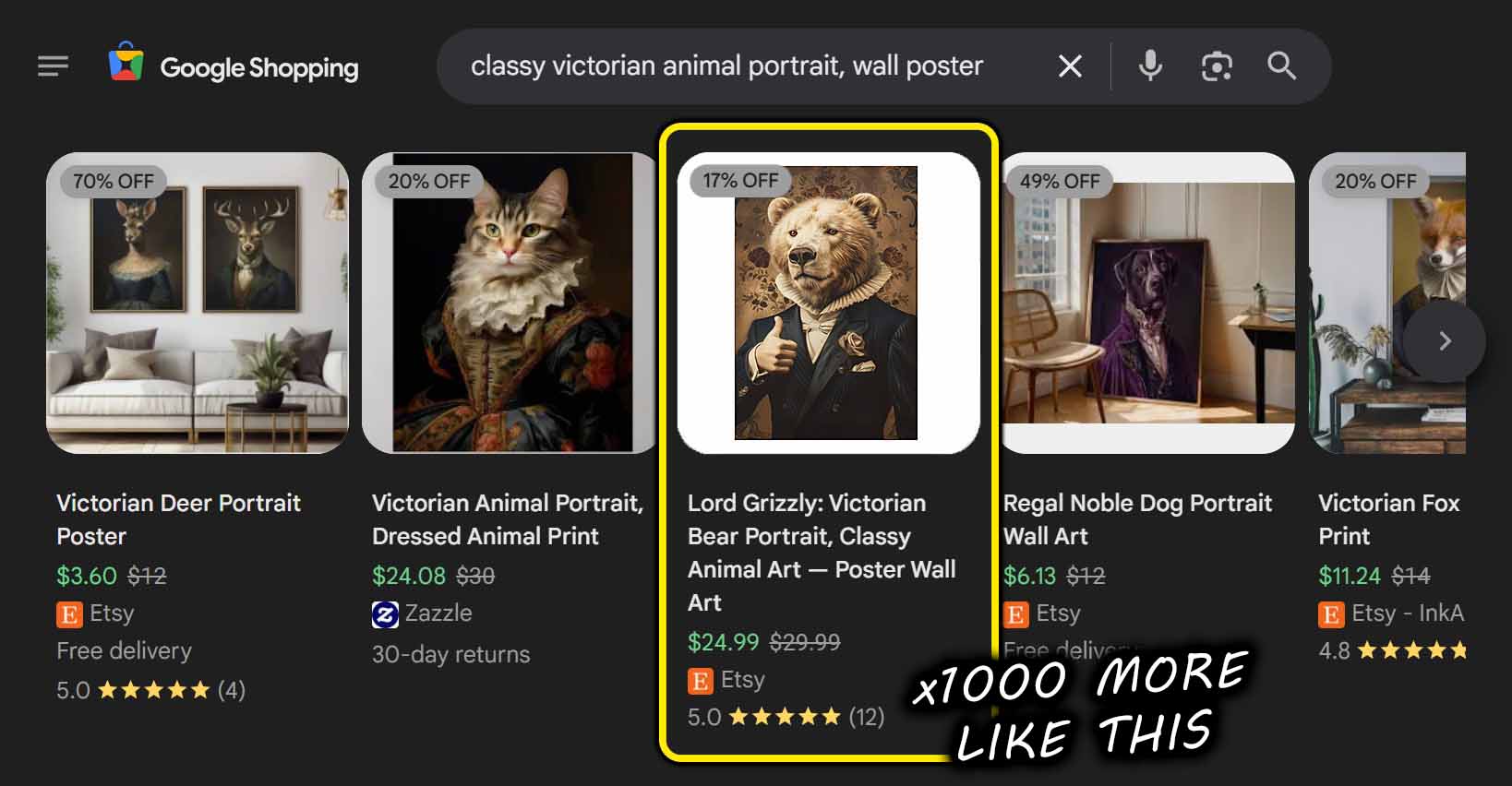
2. Exact-Match SEO Power from Combined Metadata
The synergy between custom title text and AI-generated artwork titles is extremely powerful. For example, if your custom prefix is “Canvas Wall Art” and your AI title is “Ocean Sunset Over Cliffs,” your resulting title—“Canvas Wall Art – Ocean Sunset Over Cliffs”—directly matches real search behavior.
The same principle applies to descriptions (with appended HTML for SEO context) and tags—giving your listings precise keyword combinations that search algorithms love.
3. Higher Engagement, Better Ranking Signals
AI-optimized listings don’t just rank better—they perform better. When users land on a page that matches their query exactly (thanks to AI keyword targeting), they stay longer, browse more, and are less likely to bounce.
That improved session time and reduced bounce rate tell Google and other search engines that your store offers value, pushing your listings even higher in the rankings.
4. Scale Compounds Visibility
The more products you publish, the more search queries you capture. When you automate SEO for every listing, that scale effect compounds—each new batch of listings drives incremental organic traffic, feeding into a positive feedback loop.
You go from creating a handful of searchable products to operating a catalog-wide traffic engine.
5. Continuous Discovery, Even While You Sleep
Because your listings are fully search-optimized and unique, they continue to attract traffic long after publication. Each one becomes a passive acquisition channel—quietly working in the background to bring in new customers without ad spend.
Automation lets you scale your exposure indefinitely, transforming your Printify store into a perpetual traffic funnel.
Conclusion – Scale SEO, Scale Traffic, Scale Sales
At its core, this Printify SEO automation tool is more than a time-saver—it’s a multiplier. It turns the single hardest, slowest, and most repetitive part of running a Printify business (writing optimized product data) into a one-click, fully automated process that compounds over time.
Every new batch of listings you create adds dozens—or even hundreds—of new keyword entry points into the search ecosystem. Each one can attract visitors, generate sales, and strengthen your store’s domain authority.
In practical terms:
- You produce more products in less time.
- Each product is fully optimized for SEO from day one.
- Your catalog grows into a massive network of search-optimized assets, each capable of driving organic traffic and revenue autonomously.
That’s the power of print-on-demand SEO automation at scale. It’s not just about saving time—it’s about transforming your entire Printify business into a self-sustaining growth engine, where every new operation builds on the last.
With automation doing the heavy lifting, your workflow evolves from “create and upload” to “plan and scale.”
With the Bulk POD Product Creator, you’re not just creating products—you’re building a traffic-generating machine.