
How To Rapidly Scale A Printify Store Using Automation
Overview: A practical, step-by-step workflow for scaling a Printify store using AI artwork, prompt generation, bulk product creation, and batch mockup automation—fast, consistent, and SEO-ready.

Introduction: scaling the smart way
Scaling a Printify store isn’t just about creating a few products—it’s about building a large, well-optimized catalog that can compete in search engines and capture buyers across niches. But doing this manually is painfully slow. Every product requires uploading images, positioning artwork, writing titles, typing descriptions, adding tags, and setting prices. Do that 100s of times, and you’re spending weeks clicking buttons instead of selling.
Fortunately, automation flips this equation on its head. By combining modern AI tools with dedicated automation software, you can rapidly scale your Printify store from a handful of products to hundreds—or even thousands—without burning yourself out. Below is the exact four-step workflow.
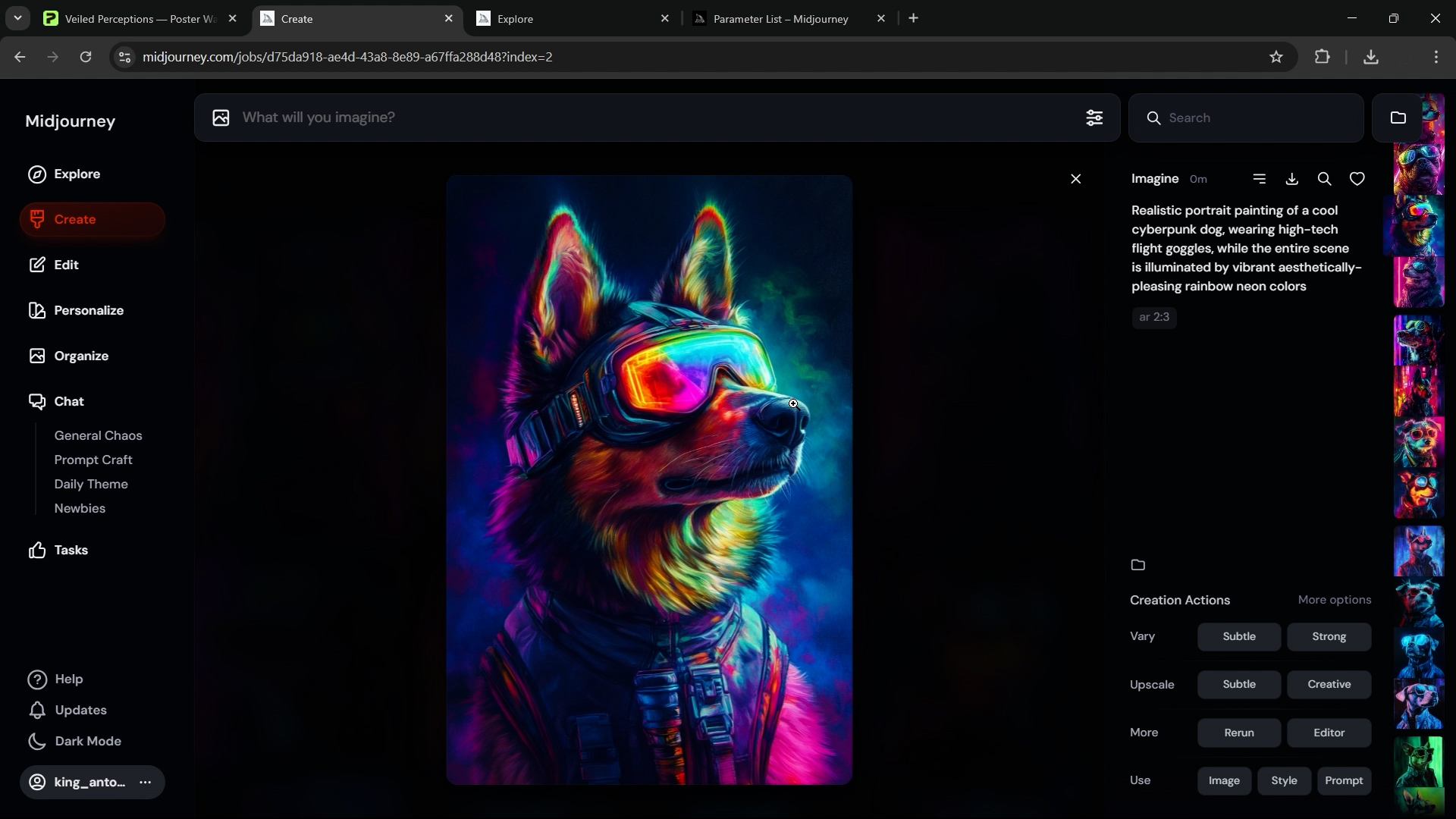
Step 1: Generate artwork images with Midjourney
Your store starts with artwork. Without a steady flow of designs, there’s nothing to sell. Midjourney, a leading AI image generation tool, makes it possible to produce vast amounts of high-quality art in record time.
Why Midjourney is perfect for POD
- Unlimited variety: from abstract landscapes and surreal portraits to minimalist line art, Midjourney can produce it.
- Niche targeting: focus prompts on audiences you want to reach—fantasy gamers, pet lovers, outdoor enthusiasts, abstract art fans—and build collections around those niches.
- Quality control: curate the best results and discard weaker ones for a polished library of designs.
- Fewer dependencies: generate original art safely and at scale instead of licensing or hiring freelancers.
⚠️ Legal note: Do not generate or sell images that violate intellectual property rights (e.g., Disney, Marvel, sports teams, corporate logos). Stick to original concepts you can safely commercialize.
Best practices for Midjourney
- Write specific prompts: include subject, color palette, style, and medium (e.g., “digital illustration,” “oil painting,” “minimalist vector art”).
- Iterate and experiment: try variations until you find what resonates with your target market.
- Organize outputs: save your best images into folders so they’re ready for bulk product creation.

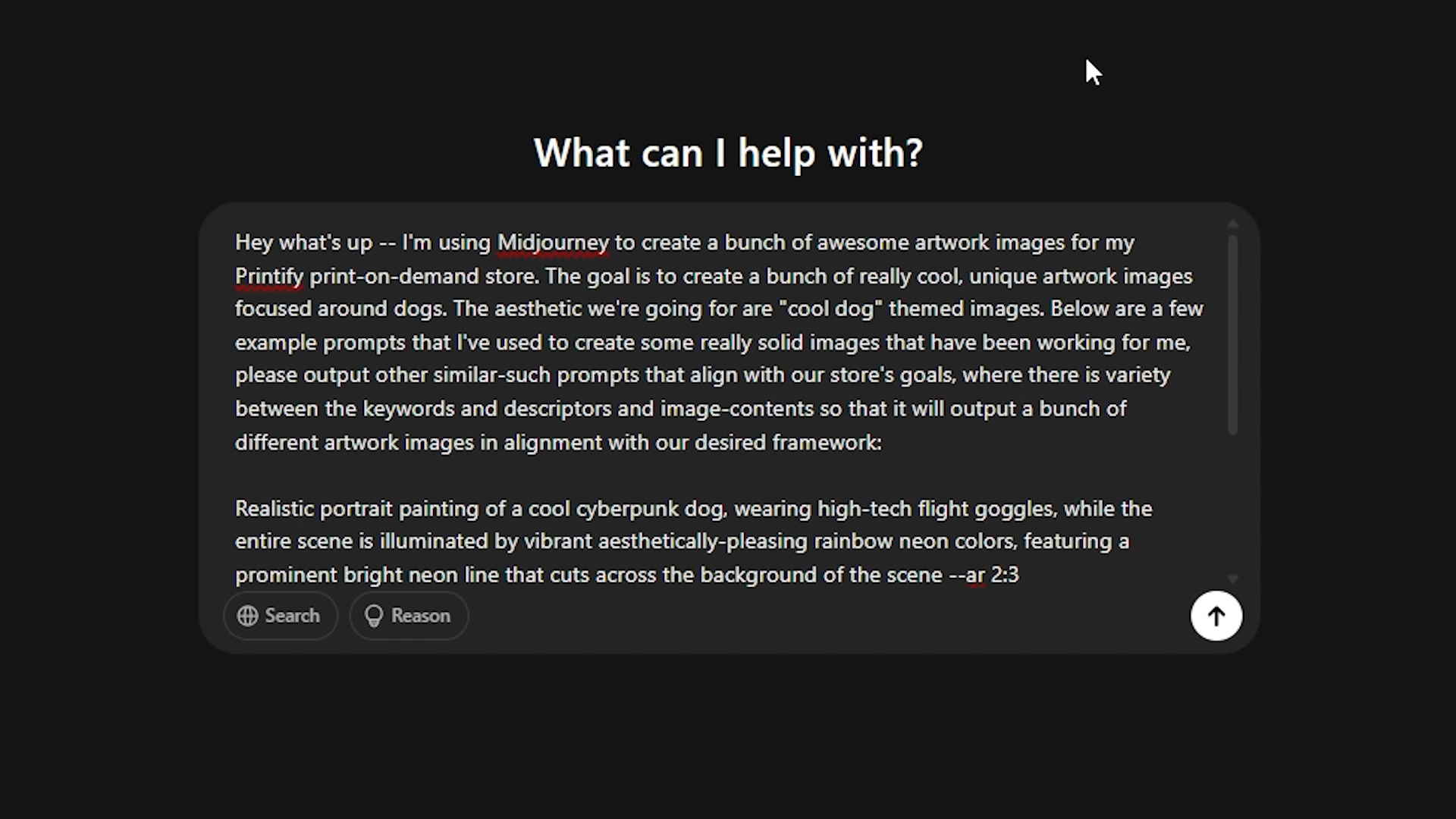
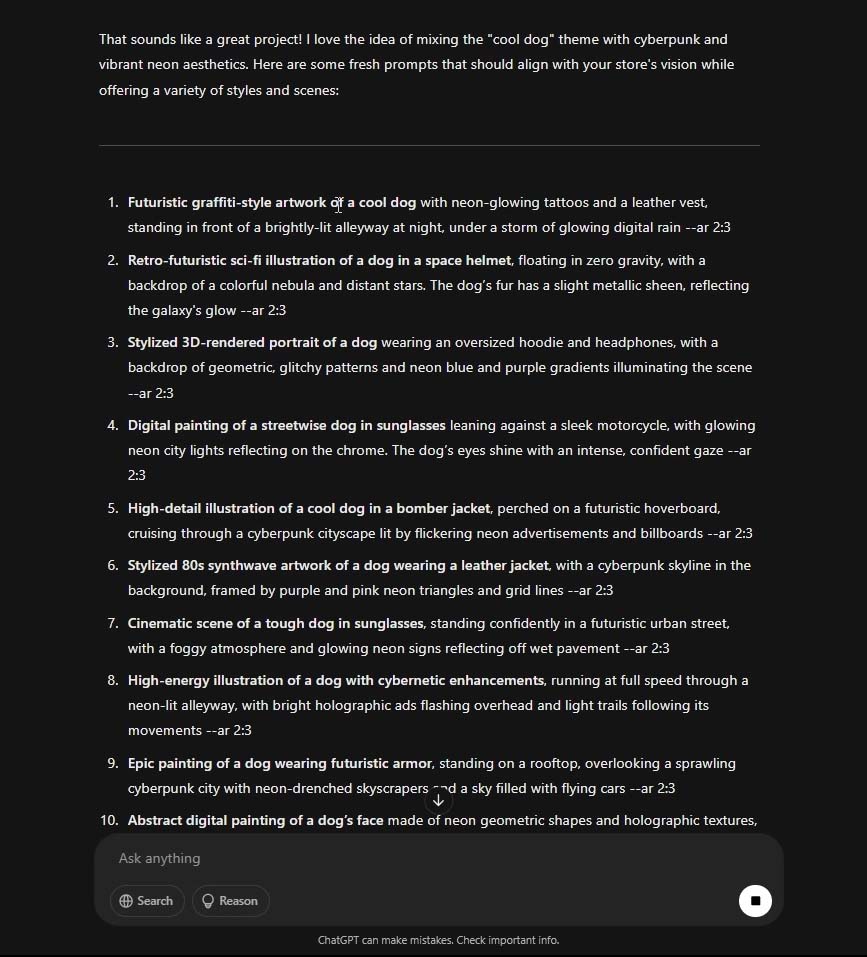
Step 2: Use ChatGPT to generate artwork-creation prompts at scale
Midjourney is powerful, but writing hundreds of unique prompts can be a bottleneck. ChatGPT removes that friction by mass-creating prompt variations based on your constraints.
Example workflow
- Define your niche: e.g., “surreal landscapes in bold neon palettes.”
- Request variations: ask ChatGPT to generate 50–100 unique Midjourney prompts, varying colors, styles, times of day, and moods.
- Produce artwork: paste those prompts into Midjourney to generate a large batch of images.
- Curate: select the strongest outputs for your store.
This pairing—ChatGPT for scalable ideation and Midjourney for image generation—creates a multiplier effect that feeds your catalog with quality designs quickly. Thus, instead of spending large amounts of time and creative energy brainstorming slight variations on Midjourney prompts, your primary focus then becomes selecting the absolute, very best images to use for your products.
Step 3: Use the Bulk POD Product Creator to automate Printify product creation
With folders of artwork ready, it’s time to convert them into products. Manually, that means uploading one file at a time, positioning designs on multiple variants, writing titles and descriptions, adding tags, and setting prices. Doing this for even 50 designs could take weeks.
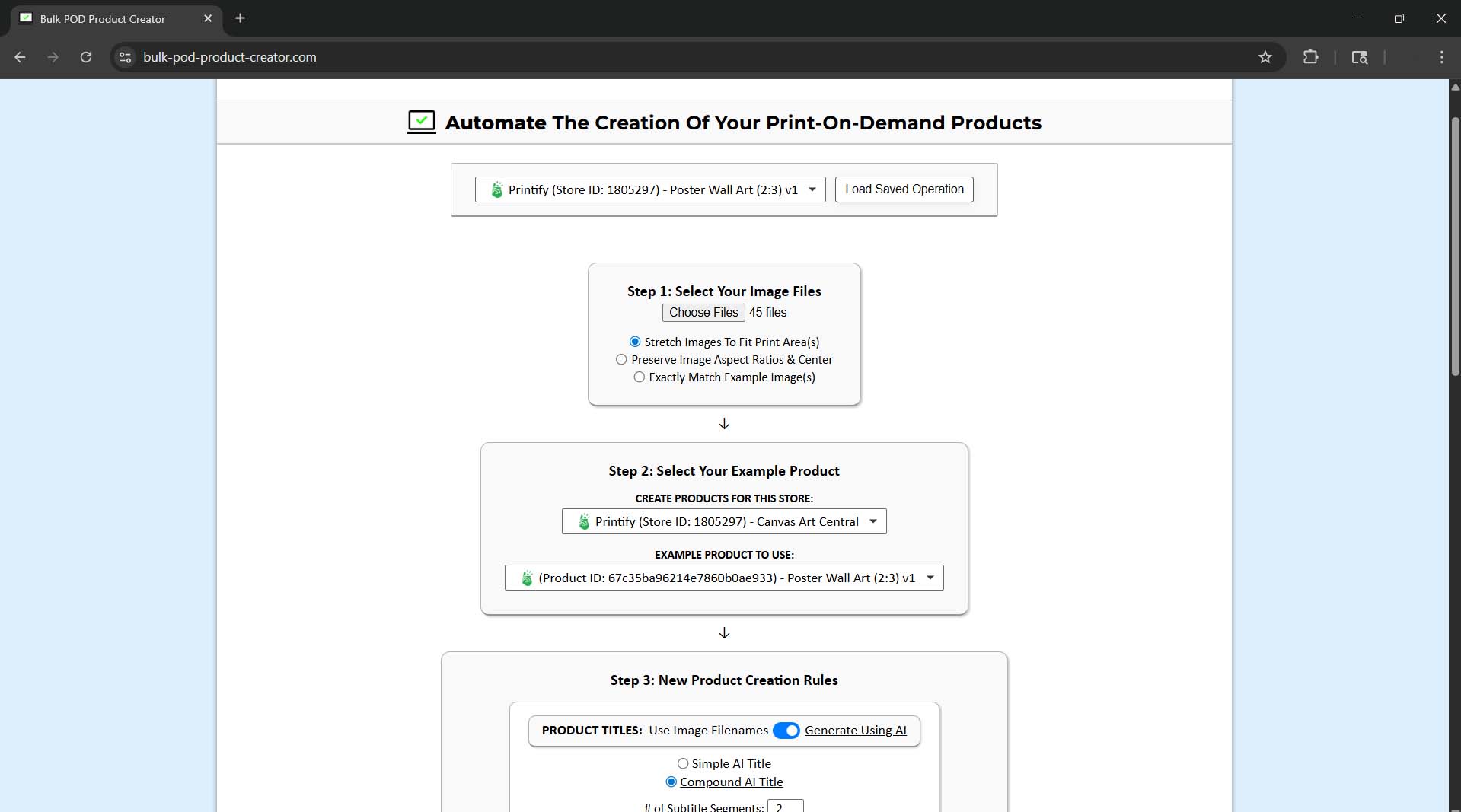
Instead, use the Bulk POD Product Creator to automate the entire product-creation workflow:
How it works
- Upload your images: select a folder with dozens—or hundreds—of designs. Each one becomes a new product automatically.
- Choose placement logic: Stretch to Fit, Preserve Aspect Ratios & Center, or Exactly Match Example—applied consistently and accurately.
- Pick an example product: choose one finished product in your store as the blueprint. Variants, print areas, and settings are cloned across the batch.
- Configure SEO rules: AI-generated titles (simple or compound), concise descriptions with optional custom HTML, and balanced tags (with evergreen terms) ensure search-friendly listings.
- Create the batch: click Create My Products and let the automation handle the grind while you focus on higher-value work.
Time-saving advantage
Setup takes about a minute—versus 10–30 minutes per product manually. Save entire configurations as Saved Operations; on your next run, load the setup, drop in new images, and click once. Scaling to 1,000+ products becomes a repeatable, low-effort process.
Step 4 (Bonus): Automate mockup image creation in Photoshop
After creating products, you need great mockups. Manually replacing artwork and exporting mockups in Photoshop is another bottleneck. The Batch-Replace Smart Objects plugin removes this friction.
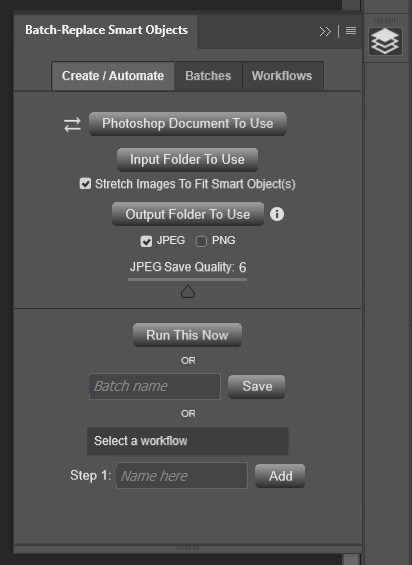
How it works
- Open a PSD mockup template (e.g., framed poster, canvas, apparel on-model) that uses a Smart Object for the design layer.
- Use the plugin to select a folder of artwork files and bulk-replace the Smart Object across the batch.
- Export hundreds of mockups automatically—consistently styled and ready for your listings.
Benefits
- Massive time savings: replace and export 100+ mockups in one operation.
- Consistent presentation: unified visual style across your storefront.
- Seamless pipeline: feed outputs directly into your Printify or e-commerce product pages.
Tip: Keep a folder of your best-performing mockup templates and standardize filenames and export settings to speed future runs.
The complete automation pipeline
- ChatGPT → generates dozens or hundreds of creative prompts.
- Midjourney → produces high-quality artwork in bulk.
- Bulk POD Product Creator → turns artwork into SEO-ready Printify products automatically.
- Batch-Replace Smart Objects Plugin → mass-produces professional mockups for your listings.
Together, this pipeline eliminates all major bottlenecks—art creation, prompt generation, product creation, SEO optimization, and mockup production—so you can focus on traffic and sales.
Bottom line: automation equals growth
Manually scaling a Printify store is slow, error-prone, and exhausting. By leveraging automation and AI, you can:
- Use ChatGPT to mass-produce creative prompts
- Generate 100s of designs with Midjourney
- Convert images into SEO-optimized print-on-demand products using the Bulk POD Product Creator
- Bulk-generate mockup images using the Batch-Replace Smart Objects plugin for Photoshop
This workflow turns scaling from a bottleneck into a repeatable system. Whether your goal is 100 products or 10,000, automation gives you the leverage to get there faster, with less effort, and with professional consistency.