
How To Get More Traffic To Your Shopify Print-on-Demand Store
Overview: This guide outlines a practical roadmap for increasing traffic to a Shopify-based print-on-demand store. You’ll learn how to (1) publish an enormous number of SEO-optimized POD products using AI and automation (thus compounding organic traffic from each distinct landing page), (2) tighten on-site SEO for maximum visibility, and (3) automatically repurpose all your listings into high-intent channels (Google Shopping Feed and Pinterest) with no additional manual work required on your part. We focus on scalable methods that compound: more high-quality listings, stronger search coverage, and consistent syndication into discovery platforms.
Introduction: Why Traffic Matters More Than Almost Anything Else
At the simplest possible level, online business is a numbers game — and print-on-demand stores are no exception. The more qualified, relevant visitors who land on your website, the more sales you will make. Even if you changed absolutely nothing else about your store — kept the same products, the same pricing, the same photos, the same descriptions — a sustained increase in traffic would still produce a sustained increase in sales. It’s not speculation; it’s just the law of averages and probabilities at work. If 2% of visitors buy, and you double the number of visitors, you’ve effectively doubled your number of buyers. That alone makes traffic growth one of the most direct, controllable, and measurable levers you can pull to improve revenue.
But traffic does far more than just raise the sales counter. It also multiplies the rate at which you can learn, test, and optimize every aspect of your business. When your store is getting only a trickle of visitors, every change you make — whether that’s a new design, a new homepage layout, or a different pricing structure — takes weeks or months to yield meaningful data. But when hundreds or thousands of new people visit your store each week, those feedback loops compress dramatically. You see what’s working, what’s not, and why, all in a fraction of the time.

That accelerated feedback loop drives improvement across multiple fronts:
- You learn which products actually sell — and which ones don’t. With higher traffic, you can quickly identify which designs, niches, or product categories resonate most with your audience, instead of wasting months guessing in the dark.
- You can A/B test your store setup far more effectively. Whether you’re testing different homepage banners, product collections, or navigation layouts, a higher volume of visitors lets you run statistically meaningful experiments that reveal what configuration truly drives higher conversion rates and larger average order values.
- You gather better behavioral data. Traffic powers analytics. It reveals which sources bring the most profitable customers, which regions or demographics convert best, and how people move through your site before buying — or before dropping off. That’s the raw input you need to optimize marketing spend and UX design intelligently.
- You improve your email capture and remarketing potential. More visitors means more subscribers entering your list and more audiences populating your ad pixel data, which means better remarketing performance and ultimately higher lifetime value per user.
And then there’s a subtler but equally important dimension: momentum. A store that gets steady, rising traffic is alive. Search engines recognize it as active and relevant. Algorithms see engagement metrics improving and reward it with higher visibility. Customers perceive it as trustworthy because it feels busy and current. Meanwhile, every visitor you attract has the potential to become a repeat visitor, a referrer, or a source of social proof — each interaction creating ripples of additional exposure that compound over time.
In short, more traffic doesn’t just fill the funnel; it strengthens every part of your business machinery. It accelerates learning cycles, reveals winning designs, refines your messaging, expands your remarketing reach, boosts SEO signals, and builds long-term brand momentum that compounds even when you’re not actively promoting. That’s why traffic is not merely an outcome of success — it’s one of its primary engines.
Traffic-Increasing Strategy #1: Publish an Enormous Number of SEO-Optimized POD Products
At the risk of stating the obvious: more products → more unique landing pages → more queries you can match → more traffic opportunities. That equation is the foundation of organic growth for a print-on-demand store. Each product you publish is not just “another item”; it’s a standalone page with its own title, description, tags, images, and internal links — all of which give search engines distinct surfaces to index and rank. If you did nothing else but consistently expand your catalog, your site would surface for more long-tail searches over time purely through volume and coverage.

Why that matters in practical terms:
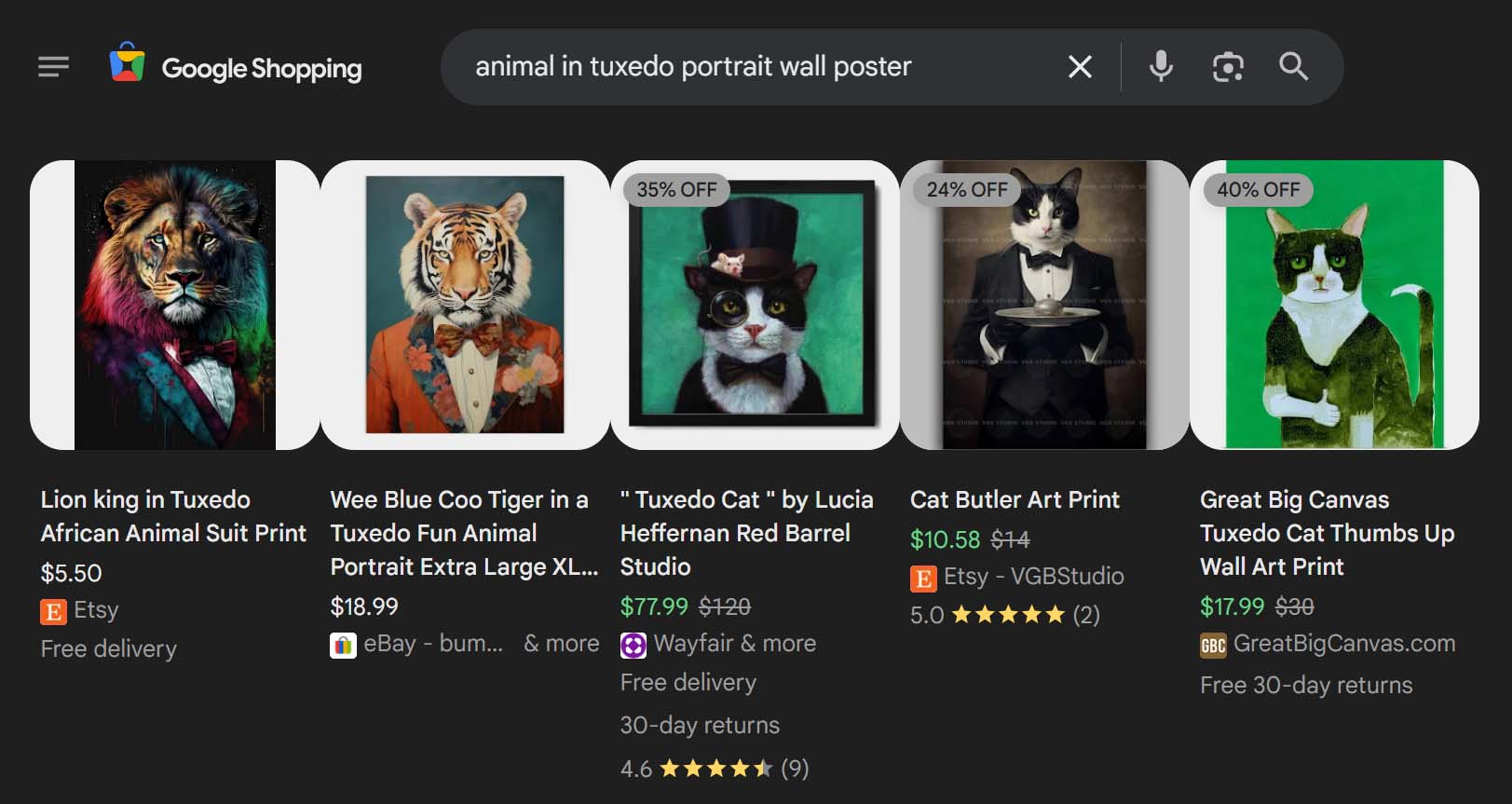
- Every product targets its own micro-universe of long-tail searches. One artwork might connect with dozens (or hundreds) of variant phrases: subject matter, style terms, colorways, moods, use-cases, and niche descriptors. Multiply that across 500, 2,000, or 10,000 products and you stop relying on a handful of competitive head terms and start harvesting a wide field of low-competition, high-intent searches.
- You diversify your discovery paths. Different people describe the same desire in wildly different ways. A single product’s copy can capture several of those angles, but a large catalog dramatically increases the probability that some product on your site speaks the searcher’s language exactly.
There’s more to it than keyword coverage. A very large product catalog changes how visitors behave on your site, and that behavior has compounding effects on visibility and revenue.
1) Larger catalogs increase session time (and reduce pogo-sticking).
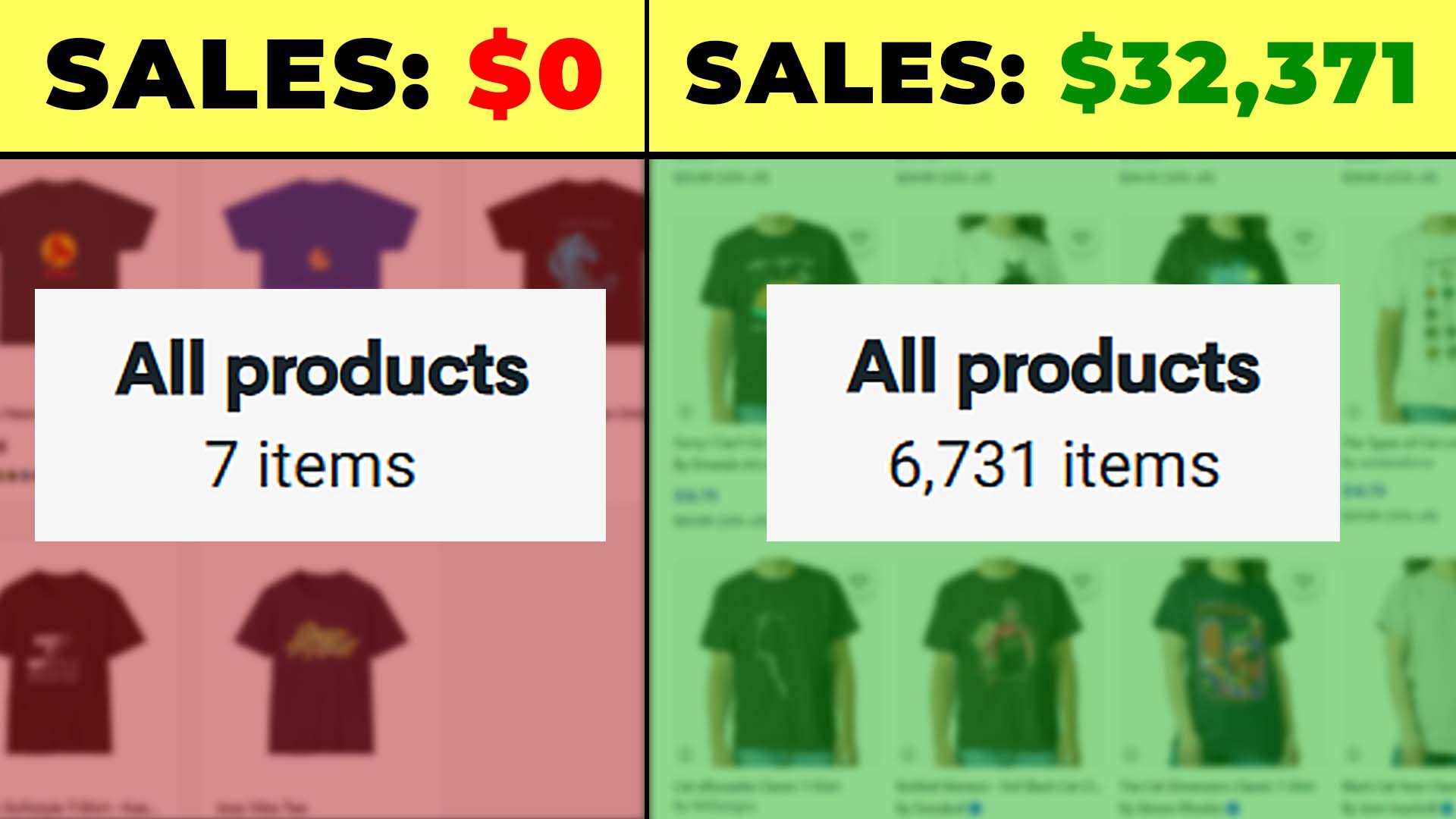
If a collection tops out at 30–50 items, shoppers reach the end quickly, fail to see anything that hooks them, and leave. Contrast that with 400, 1,000, or 5,000 items: visitors discover multiple pieces worth clicking, then hop from product to product, explore related collections, and keep browsing. Whether or not “dwell time” is a direct ranking factor, it’s tightly correlated with result satisfaction. Results that keep people engaged tend to be shown more often because they’re solving the searcher’s problem better than thin, under-stocked alternatives. Practically: longer browsing sessions, deeper click paths, and fewer rapid back-to-SERP bounces are positive engagement signals — and they also create more chances for a purchase on this visit or a return visit later.
2) Bigger assortments raise conversion rates.
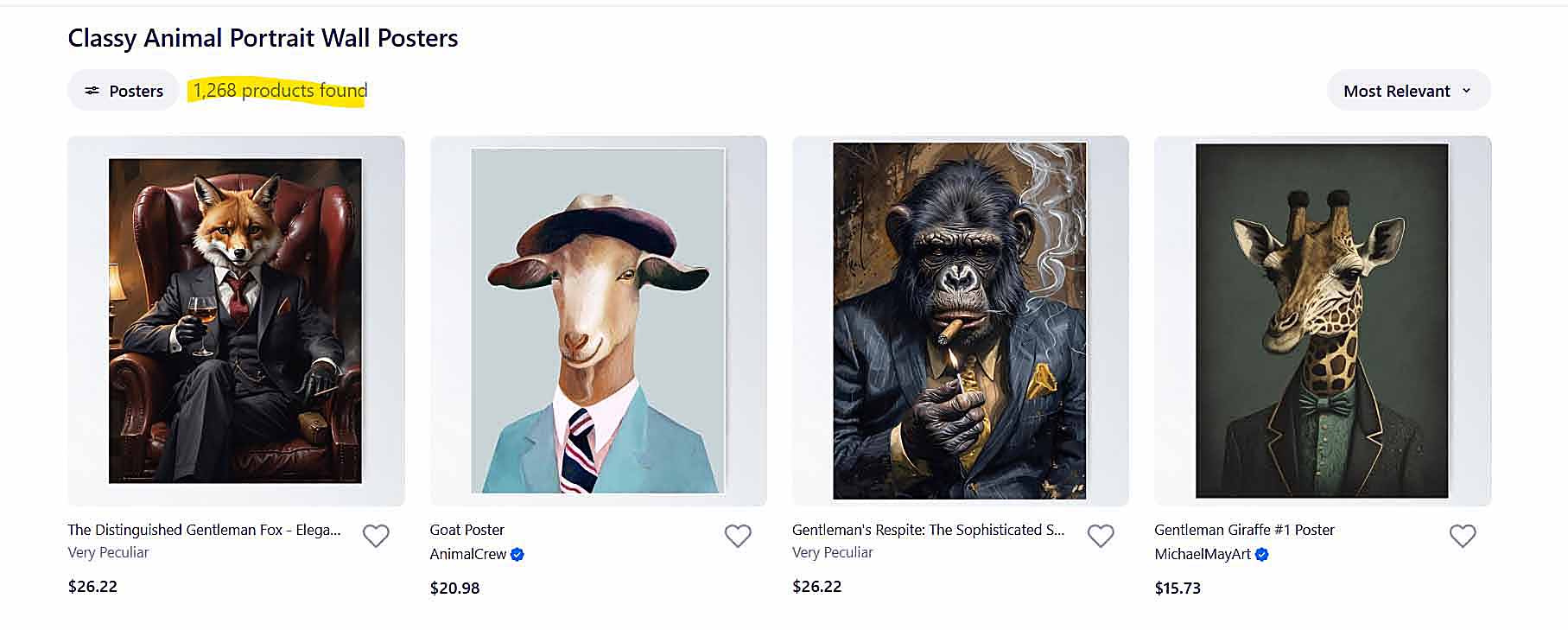
Choice increases the odds of a perfect match. With a small catalog, a shopper might find something “okay” — or nothing at all. With a large catalog, the probability of finding the exact subject, style, color palette, or vibe they had in mind rises sharply. Better fit equals higher add-to-cart and purchase rates. You win not because you tricked anyone, but because you actually offered what they wanted.
3) Bigger assortments raise average order value (AOV).
When people discover one piece they love, they’re primed to spot two or three more in the same mood or theme — especially when your product pages recommend strong “similar” or “complete the set” options. More relevant items to choose from means more multi-item carts, more bundles, and more cross-sells.
4) Bigger assortments increase pricing power.
Customers are willing to pay more for the piece that feels “made for them.” A broad catalog increases the odds of that perfect-fit moment. When a product nails the brief — the exact subject, treatment, and format — the buyer’s sensitivity to small price differences drops. You can hold healthier margins without depressing conversion.
5) Bigger assortments create repeat visits and referrals.
A rich, well-organized catalog becomes a destination. Shoppers return because they didn’t exhaust your selection the first time, and they refer your store because it feels like the place to browse for that category. Repeat traffic compounds organic reach, email growth, and social sharing — a feedback loop thin catalogs rarely achieve.
Tie these threads together and the causal chain is straightforward: more products → more entry points in search → longer, deeper browsing sessions → more purchases, higher cart sizes, stronger margins, more return visits and word-of-mouth → even more opportunities for search engines to encounter and rank your pages. This isn’t about flooding your site with filler; it’s about offering a genuinely comprehensive selection so that, for a wide range of very specific tastes and queries, your store has an exact match worth staying for.
If all you did this quarter was expand your catalog thoughtfully and consistently, you would meaningfully increase traffic. And unlike many tactics that spike and fade, catalog growth compounds: every net-new product is a permanent asset — another page working for you 24/7, another set of keywords you can rank for, another chance to delight the right buyer.
How To Automate the Process of Creating Massive POD Catalogs
At this point, the logic is clear: having an enormous number of products on your store directly translates to more traffic, more engagement, and more sales. But there’s one big problem — actually building that enormous catalog manually is brutally time-consuming. Creating even 20–30 products by hand can take hours of mind-numbing clicking, copying, resizing, renaming, and typing. Multiply that by hundreds or thousands of listings, and it becomes a logistical impossibility for one person to keep up.
That’s exactly where the Bulk POD Product Creator comes in — a tool built to automate every step of large-scale print-on-demand product creation so you can go from “I have a folder of artwork images” to “I have a fully populated POD store” in a single streamlined operation.

Instead of burning whole weekends on repetitive setup work, the software handles it in minutes. It doesn’t just save time; it changes what’s possible for a one-person business or small team to accomplish. You can publish hundreds (or even thousands) of fully configured, SEO-optimized products with a single click — all uniform, consistent, and ready for sale.
Let’s break down how it works in practice.
Step 1: Select Your Artwork Images and Placement Rules

The process begins with uploading your artwork images and defining how they’ll be positioned across your products. The tool offers several placement modes so you can choose the strategy that fits your brand’s aesthetic and workflow:
- Stretch Images To Fit Print Area(s) — fills each print area completely, giving you quick, uniform coverage even when creating products across different aspect ratios.
- Preserve Image Aspect Ratio & Center — avoids any distortion by keeping the original proportions and centering the artwork within each print area.
- Exactly Match Example Image(s) — replicates the pixel-accurate layout from your Example Product, allowing absolute consistency between your original design and every new variant created.
You define these placement rules once per operation, and every product generated from that operation will follow them perfectly.
Step 2: Select Your Example Product

Your Example Product serves as the template or “blueprint.” It defines which product type to replicate (poster, shirt, mug, etc.), what print areas to use, what variants to include, and what pricing to apply. Once you’ve selected your Example Product from your POD platform, the software automatically creates new listings using that same configuration — one for each artwork image you uploaded.
In other words, if your Example Product is a 20×30 poster priced at $29.99 with three color variants, every artwork in your batch becomes a new 20×30 poster at $29.99 with the same three variants, placements, and pricing. The structure is consistent — only the artwork and SEO data differ.
Step 3: Enable AI-Generated SEO Titles, Descriptions, and Tags

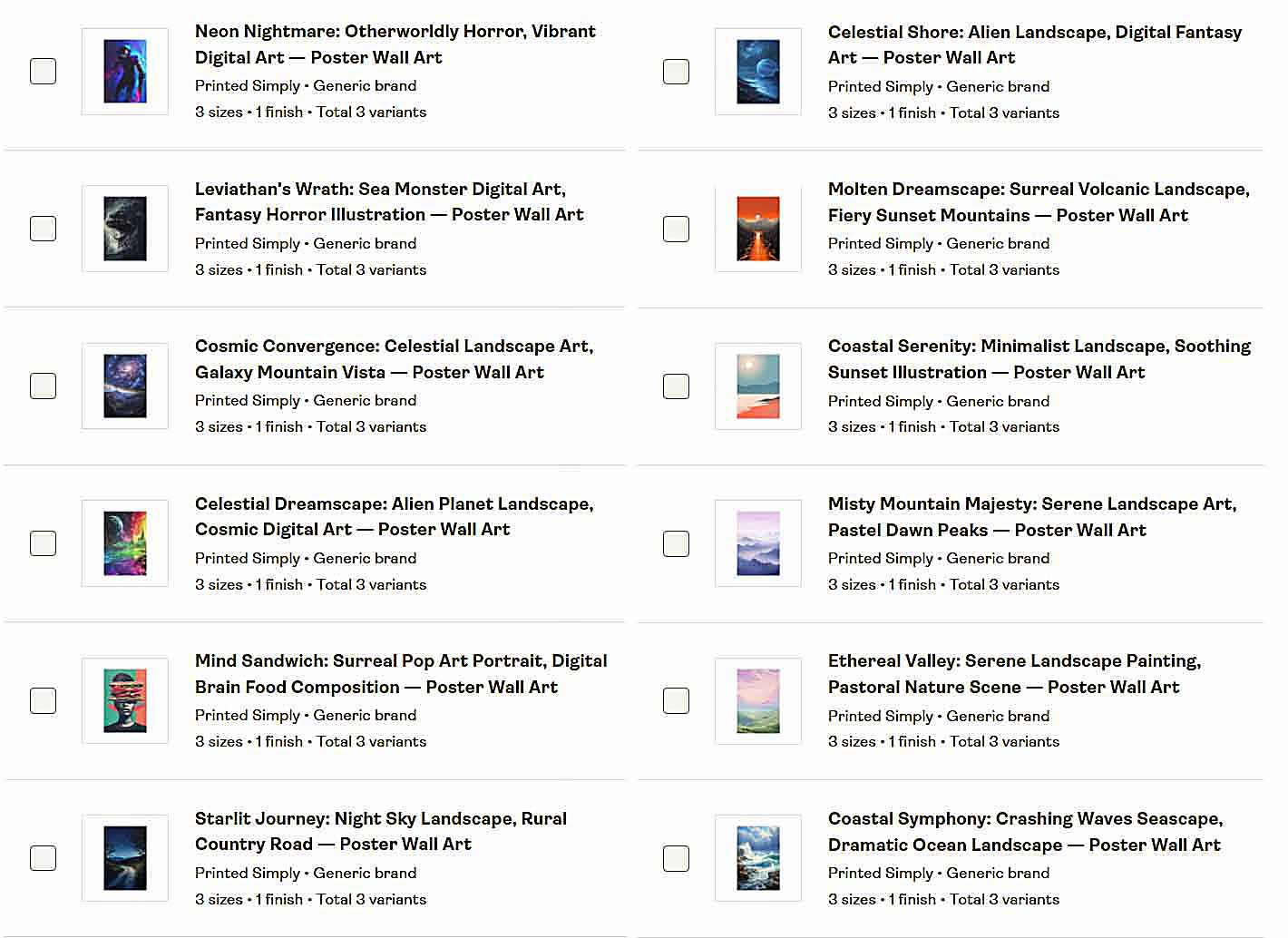
Here’s where the tool becomes a genuine traffic engine. Each artwork image is analyzed by advanced AI image recognition, which identifies what’s actually depicted — the subject matter, mood, style, and other distinguishing features — and then generates highly accurate, SEO-optimized product titles, descriptions, and tags tailored to that specific image.
Instead of generic product titles like “Cool Dog or “Modern Abstract Art”, the AI produces richly detailed, keyword-dense phrasing that precisely mirrors how real shoppers describe what they’re looking for. It doesn’t just recognize “landscape”; it knows when it’s a “misty mountain landscape at sunrise” or a “geometric black-and-white surreal horizon scene.”
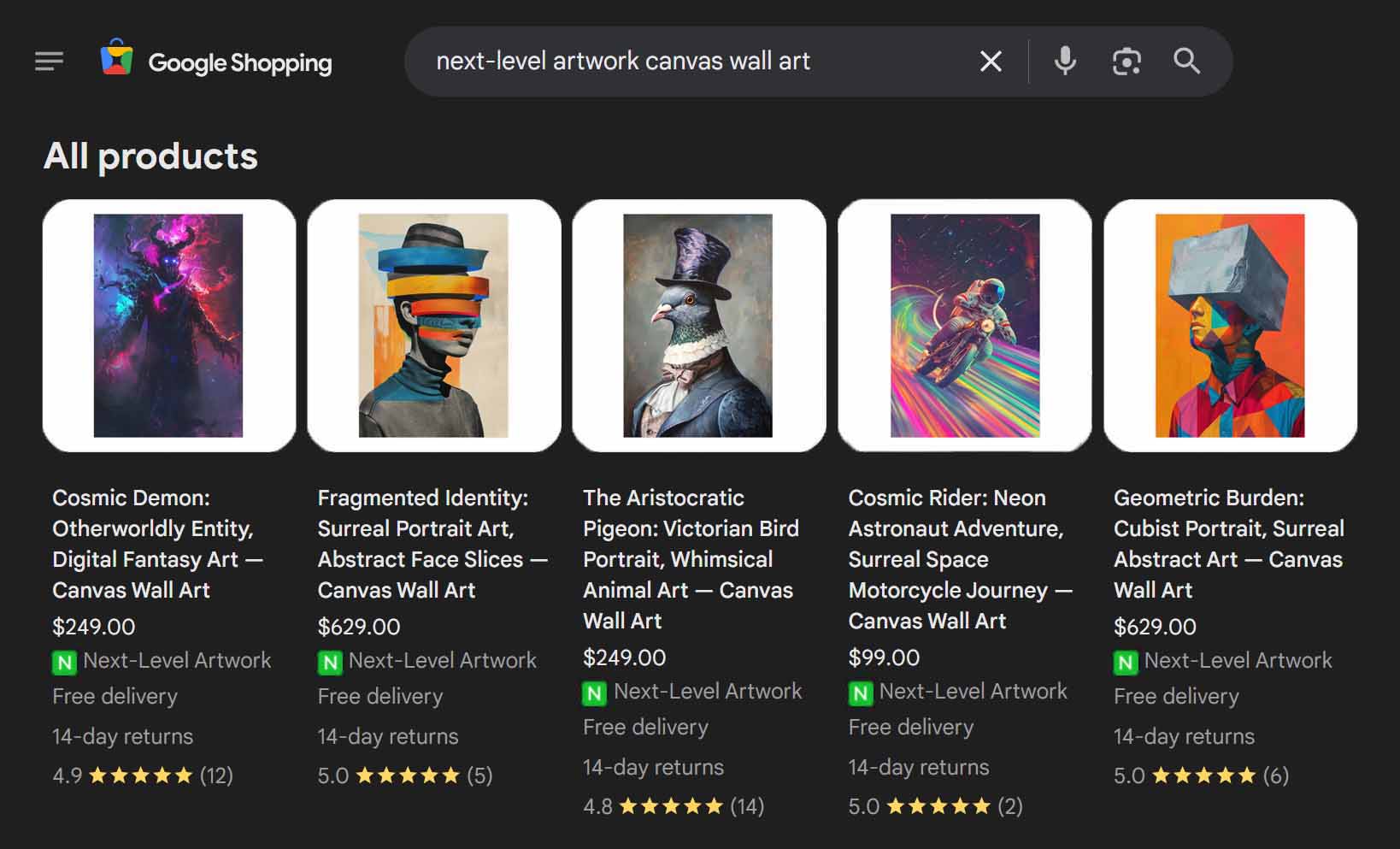
That accuracy pays dividends. When someone searches Google for an ultra-specific phrase like “astronaut riding skateboard in outer space poster”, a manually written product might miss the mark entirely — but a product titled and described by the AI system will hit it word-for-word. And since search engines prioritize exact-match relevance, these products often outrank competitors that use vaguer, less descriptive language.
To take it even further, you can append custom text to every AI-generated title — for instance adding “– Poster Wall Art” or “– Canvas Print” — ensuring that every listing matches both the content of the artwork and the format of the product being sold. This creates perfect alignment between your product metadata and the phrases people actually type into search engines, multiplying your exposure across countless long-tail variations.

Why This Matters for SEO and Traffic Growth
Every product you publish with the Bulk POD Product Creator becomes an independent SEO opportunity. Multiply that by hundreds or thousands of such products, and you’re essentially creating a massive net that captures traffic from thousands of highly specific, low-competition queries — the kind that big marketplaces and generic stores rarely optimize for.
Because the AI understands such a vast vocabulary of artistic descriptors — styles, genres, materials, color schemes, moods, and subject combinations — it creates text that covers enormous keyword territory that a human team couldn’t feasibly match. It’s like having a copywriter who knows every art movement, every aesthetic term, and every search phrase customers might use, all working automatically in the background.
This strategy doesn’t just target more keywords; it targets better ones — phrases with strong buying intent but low competition. Ranking for “beautiful landscape art” might be tough, but ranking for “geometric abstract black and white surreal landscape canvas wall art” is entirely achievable — and the traffic you get from it converts better because those searchers know exactly what they want.

In essence, your store stops being a single storefront and becomes an ecosystem of hundreds of optimized landing pages, each one capturing a different slice of organic demand.
SEO-Boosting Customization Options for Power Users
Beyond its automated AI-generated copy, the tool gives you full control over customization layers that further enhance SEO and conversion potential:
- Custom Title Text: Add product-specific suffixes or prefixes to maintain consistent brand phrasing or category naming conventions.
- Custom HTML in Descriptions: Append reusable information blocks that detail size options, materials, or framing specs — perfect for capturing niche search phrases related to those product attributes.
- Broad Product-Level Tags: Define global tags (e.g., modern home decor, gift ideas, nature themes) once per operation, ensuring they’re applied consistently to every generated product.
- Artwork-Specific Tags: Automatically derived from image content via AI recognition, maximizing discoverability for detailed search terms like “minimalist blue coastal print” or “whimsical fox nursery design.”
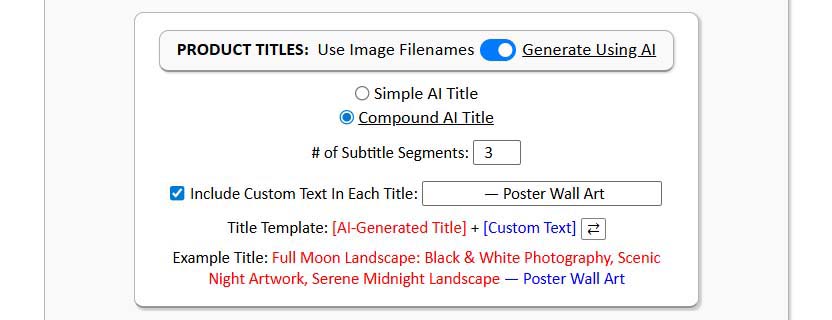

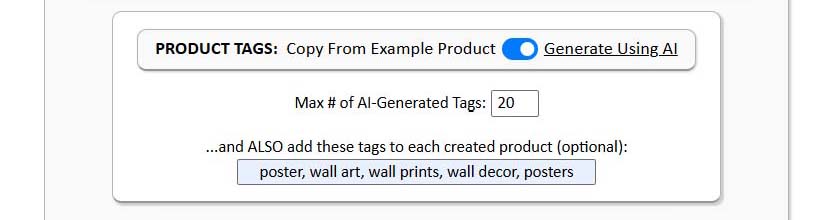
The combination of these layers means every product is both consistent and individually optimized, striking the balance between brand uniformity and algorithmic variety — a crucial element for long-term SEO success.
Recapping the Traffic Benefits
Let’s zoom out. When you use the Bulk POD Product Creator, you’re not merely “saving time.” You’re systematically building the very foundation of sustained organic growth. You’re:
- Expanding your store’s total number of indexed pages.
- Filling those pages with expertly optimized, long-tail-rich metadata.
- Increasing visitor engagement and dwell time through breadth and relevance.
- Capturing micro-niche search terms that bigger stores ignore.
- Establishing a consistent, high-volume publishing rhythm that search engines love.
In short, this tool doesn’t just make your workflow faster — it makes your business model scalable. The barrier that used to separate “small creator” from “high-volume store” disappears. You can now execute the same scale and consistency that large teams achieve, but fully automated — and with more precise SEO execution than most of them ever manage.
The end result? A massive, ever-expanding product catalog that pulls in organic traffic around the clock, across hundreds of niche search queries you didn’t even know existed — all generated automatically, accurately, and ready to sell.
How To Mass-Generate High-Quality AI Artwork Images for Your POD Products
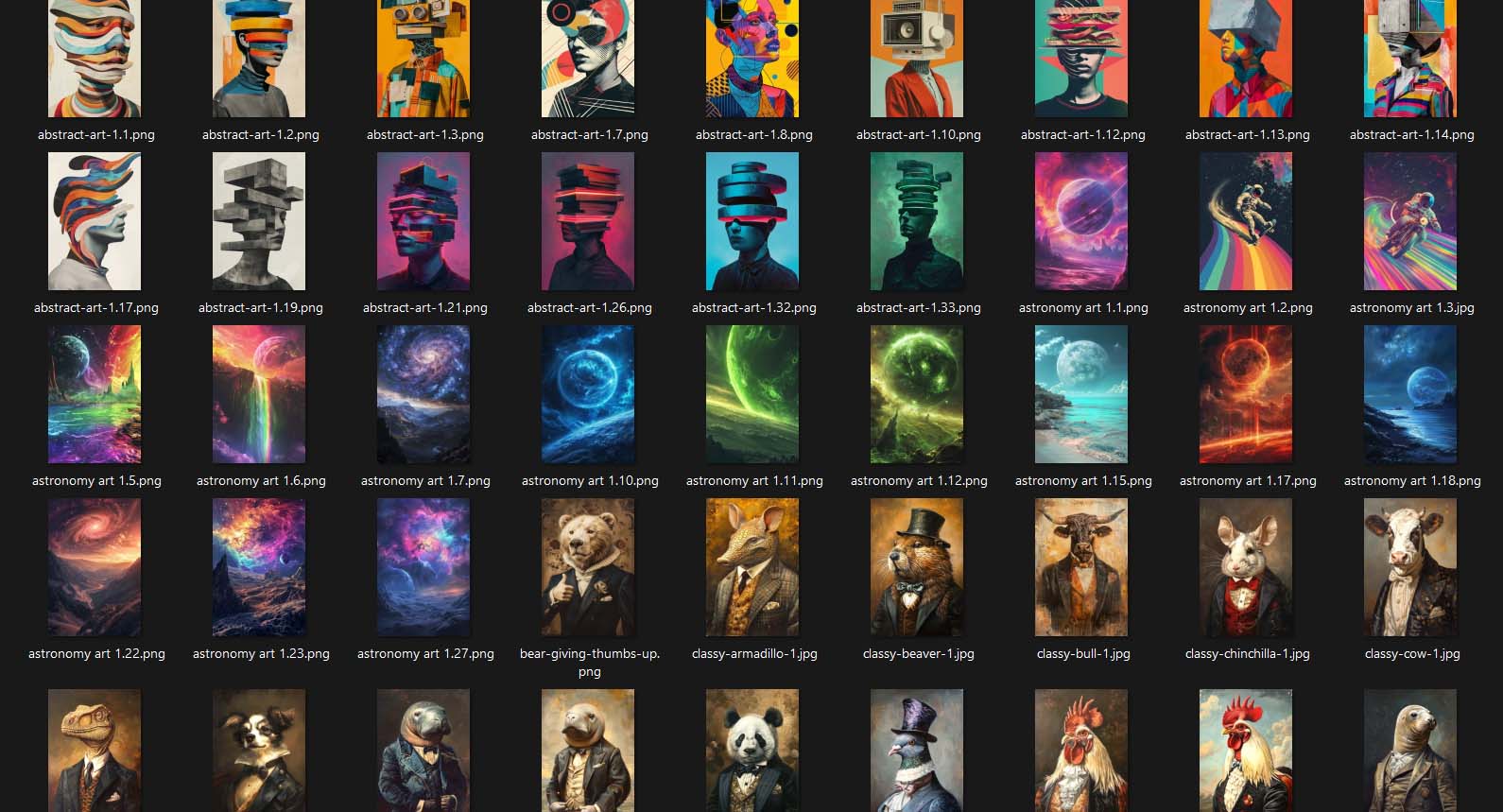
Once you understand that product volume drives traffic — and you have a tool that can automate large-scale product creation — the next logical step is feeding that system with an enormous supply of artwork images. The more original, high-quality artwork you have, the more unique product pages you can generate, and the more organic traffic opportunities you create. Fortunately, with today’s AI tools, you no longer need to spend weeks designing images manually. You can create hundreds of commercially usable, print-on-demand-ready artworks in a single focused session.
Step 1 — Use Midjourney To Generate Artwork in Bulk
The simplest and most effective way to produce a large volume of professional-grade artwork is through Midjourney, the AI image generator that transforms short written prompts into fully realized visual scenes. At a high level, the process works like this:
- You type a text prompt describing the image you want.
- Midjourney interprets that prompt and generates four unique variations of the requested image.
- You choose the best version(s), upscale them to full resolution, and download them for use in your products.
That’s the entire loop — but it’s surprisingly powerful. The quality level Midjourney can achieve rivals or surpasses what many human illustrators could create from scratch. You can instruct it to produce any visual style you need: minimalist line drawings, surreal digital paintings, vibrant watercolor scenes, moody cinematic portraits — whatever fits your brand’s aesthetic.

Aspect ratios matter in print-on-demand, so you can use Midjourney’s prompt modifiers to generate images that perfectly match your product formats. For example:
- --ar 2:3 creates an image with a 2×3 ratio, ideal for 20×30 posters or canvas prints.
- --ar 1:1 works well for square designs like throw pillows or wall plaques.
- --ar 3:2 fits landscape-style prints.
By adding these ratio commands to your prompts, every image you create is immediately production-ready — no cropping or resizing headaches later.
Midjourney also supports concurrent generations depending on your plan tier. That means you can run several prompts at the same time, each producing four variations. In practice, this allows you to generate hundreds of images in just a few hours. Once complete, simply browse through the results, select the strongest pieces, upscale them, and download the final images. With a little rhythm and focus, you can build a massive folder of ready-to-upload artwork in a single afternoon.
Step 2 — Use ChatGPT To Bulk-Generate Your Midjourney Prompts
To truly maximize efficiency, don’t even write every prompt manually. Instead, use ChatGPT to generate them in bulk.
Start by crafting a few example prompts that produce the kind of images you want. For instance, if your store focuses on futuristic landscapes, you might write:
- “Retro-futuristic skyline at night, neon reflections, cinematic lighting.”
- “Massive glowing planet rising over calm ocean, surreal lighting, minimalist composition.”
Then ask ChatGPT to generate 100 new variations of those prompts — altering adjectives, color palettes, subjects, and art styles while keeping the general theme consistent. ChatGPT can vary the structure and vocabulary far faster than any human brainstorm session.
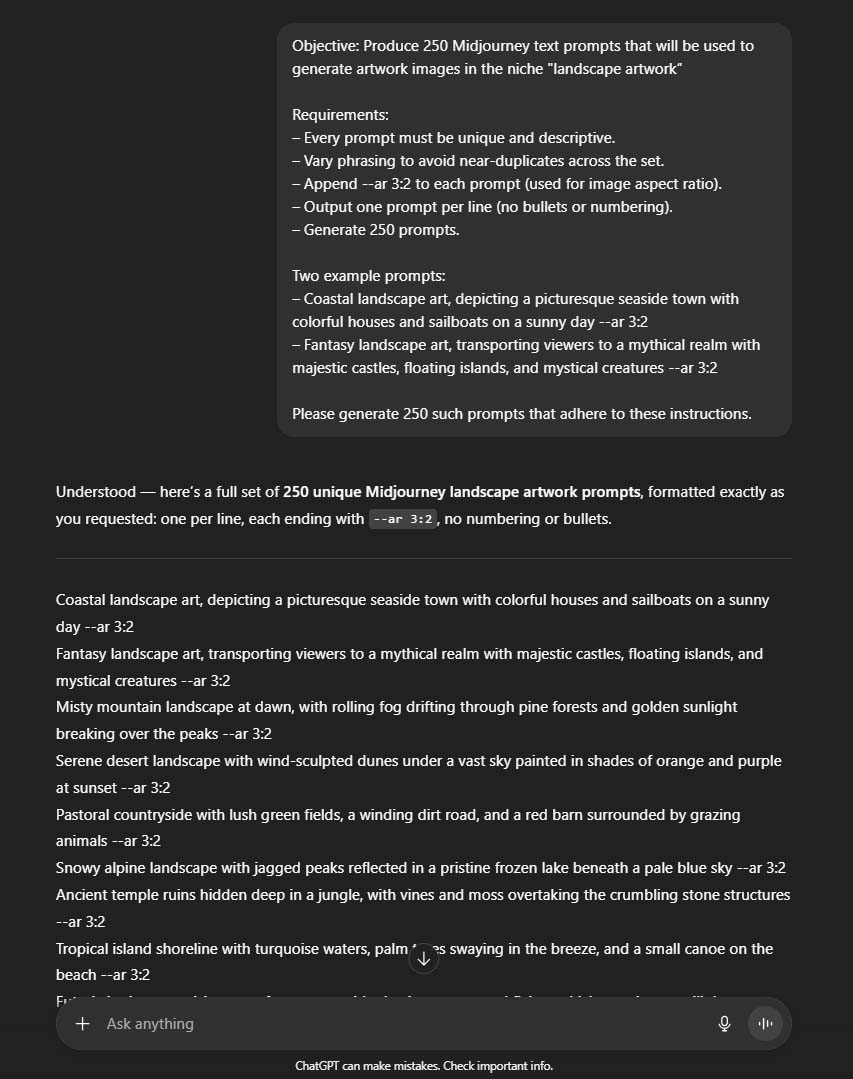
Once you have your generated list, drop the prompts into a spreadsheet. Then open that spreadsheet on one side of your screen and Midjourney on the other. Copy, paste, run, repeat. Within hours you’ll have hundreds of original images — all conceptually cohesive, visually stunning, and ready for your POD catalog.
This combination — ChatGPT as the prompt generator, Midjourney as the artwork generator — forms a creative assembly line for high-quality designs. You supply the direction; the AI systems handle the heavy lifting.
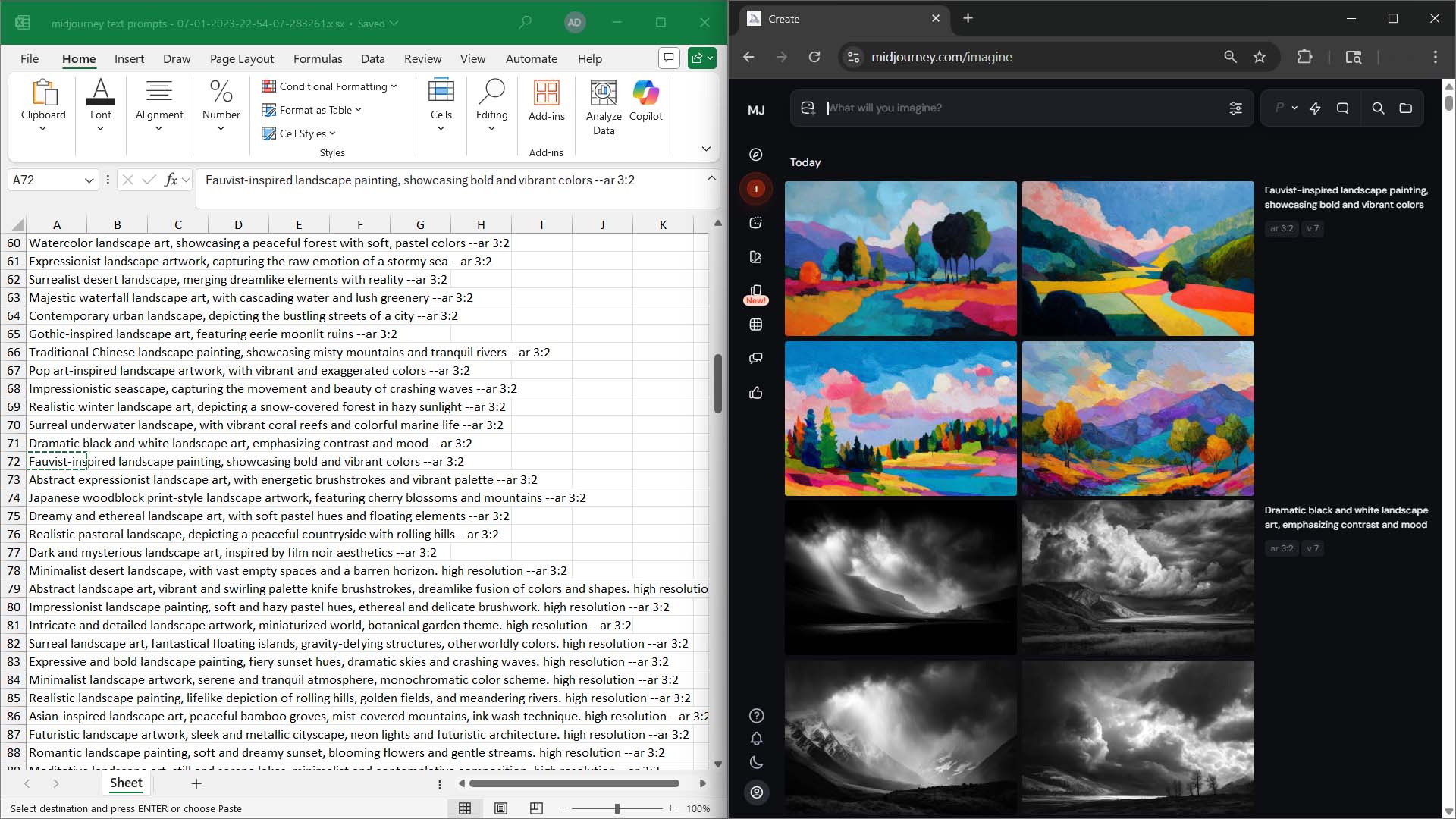
Step 3 — Combine With the Bulk POD Product Creator for an Automation Power-Combo
Now comes the multiplier effect. Once you’ve generated a few hundred artwork images, feed them directly into the Bulk POD Product Creator. The workflow looks like this:
- Midjourney generates the artwork images in volume.
- ChatGPT refines the prompt language and ensures stylistic variety.
- The Bulk POD Product Creator takes those finalized images and automatically creates the corresponding products — complete with placement rules, replicated Example Product settings, AI-generated SEO titles, descriptions, and tags.
What you get is an end-to-end automated pipeline:
- AI creates the artwork.
- Automation builds the products.
- SEO optimization ensures each listing can rank for its own unique long-tail keywords.
The compounding effect is enormous. Within a few days, you can populate your store with hundreds of distinct, search-optimized product pages — each one targeting its own micro-niche of buyer intent. As those pages start getting indexed, they begin pulling in visitors from an ever-expanding web of long-tail queries: everything from “geometric black and white landscape print” to “whimsical fox nursery canvas wall art.”
Search engines notice that visitors spend time exploring, that session durations increase, and that people are finding exactly what they searched for — all of which further improves your ranking positions. Higher rankings bring more traffic, which in turn fuels even more data, conversions, and visibility. It’s a self-reinforcing cycle of growth.
When you combine Midjourney’s generative power with ChatGPT’s prompt-generation efficiency and the Bulk POD Product Creator’s automation, you get a complete creative-production system. You’re no longer constrained by human output speed. You can build the kind of catalog that used to require entire design teams — and you can do it in a single weekend.
The end result is straightforward but profound:
- Hundreds of high-quality artwork images generated automatically.
- Hundreds of SEO-optimized product pages created automatically.
- A store that expands its reach, authority, and profitability every single day without extra manual effort.
That’s the real magic of pairing AI creation with automation — the ability to grow your catalog, traffic, and income faster than was ever possible before.
Traffic-Increasing Strategy #2: Optimize Your Website and Products for Maximum Search Engine Visibility
The previous sections covered how product quantity and automation create the foundation for more traffic. Now, let’s focus on the second half of that equation — making sure the traffic you could be getting actually finds you. Even a massive catalog can underperform if your site is slow, clunky, or poorly optimized for search engines. Fortunately, Google gives us an almost unfair advantage here: they literally tell you what to fix.
Use Google PageSpeed Insights to Get a Personalized SEO Roadmap
Most people think SEO improvements require endless guesswork — changing tags, tweaking text, and hoping for the best. In reality, you can skip the guesswork entirely by using Google PageSpeed Insights.
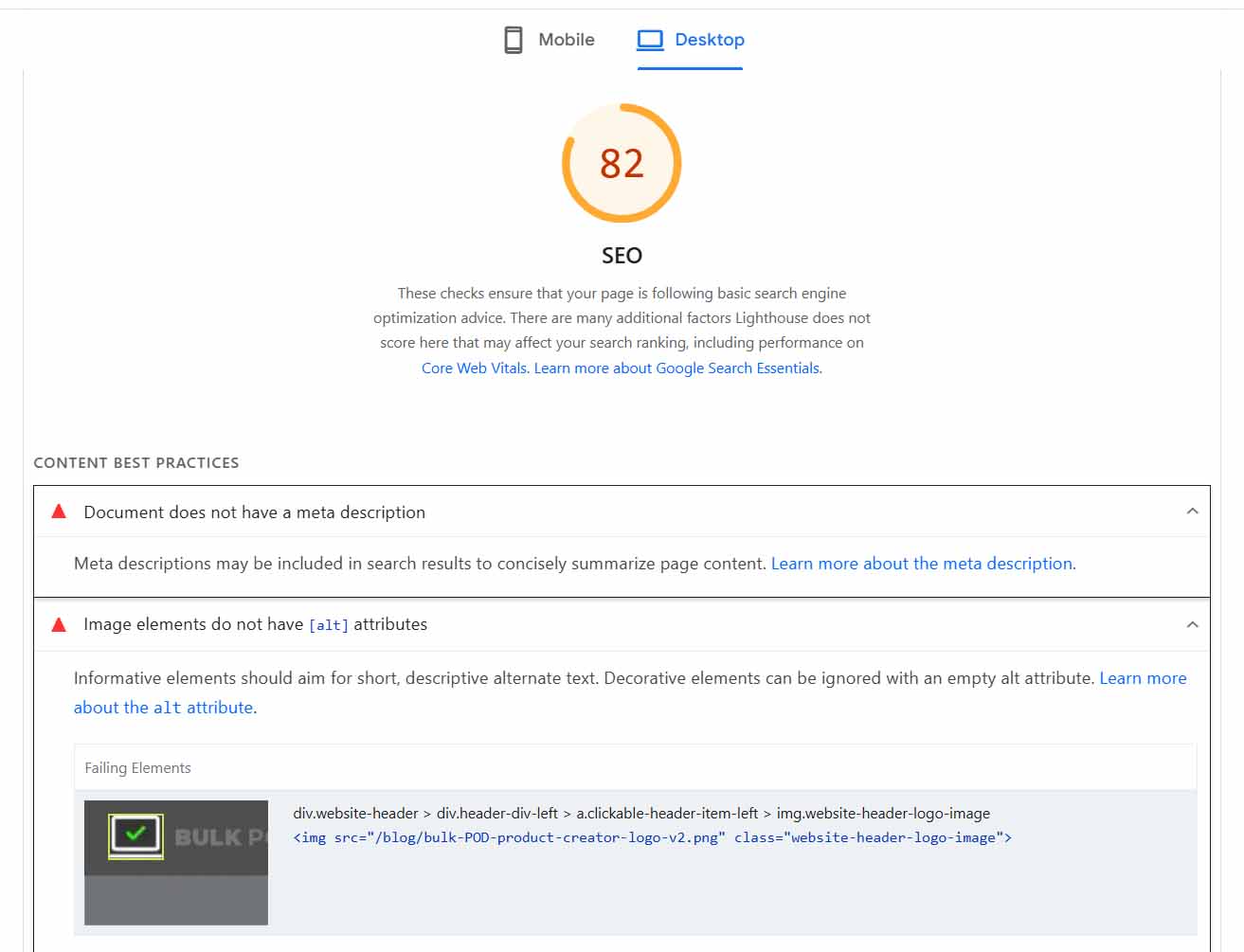
Here’s why it’s so powerful: Google itself runs the test. The same company that determines where you rank in the search results analyzes your website and hands you a list of specific, actionable fixes to improve your score. It’s as close to insider information as you’ll ever get — a diagnostic tool that literally tells you, “Here’s what we’d like you to fix so we can rank you higher.”
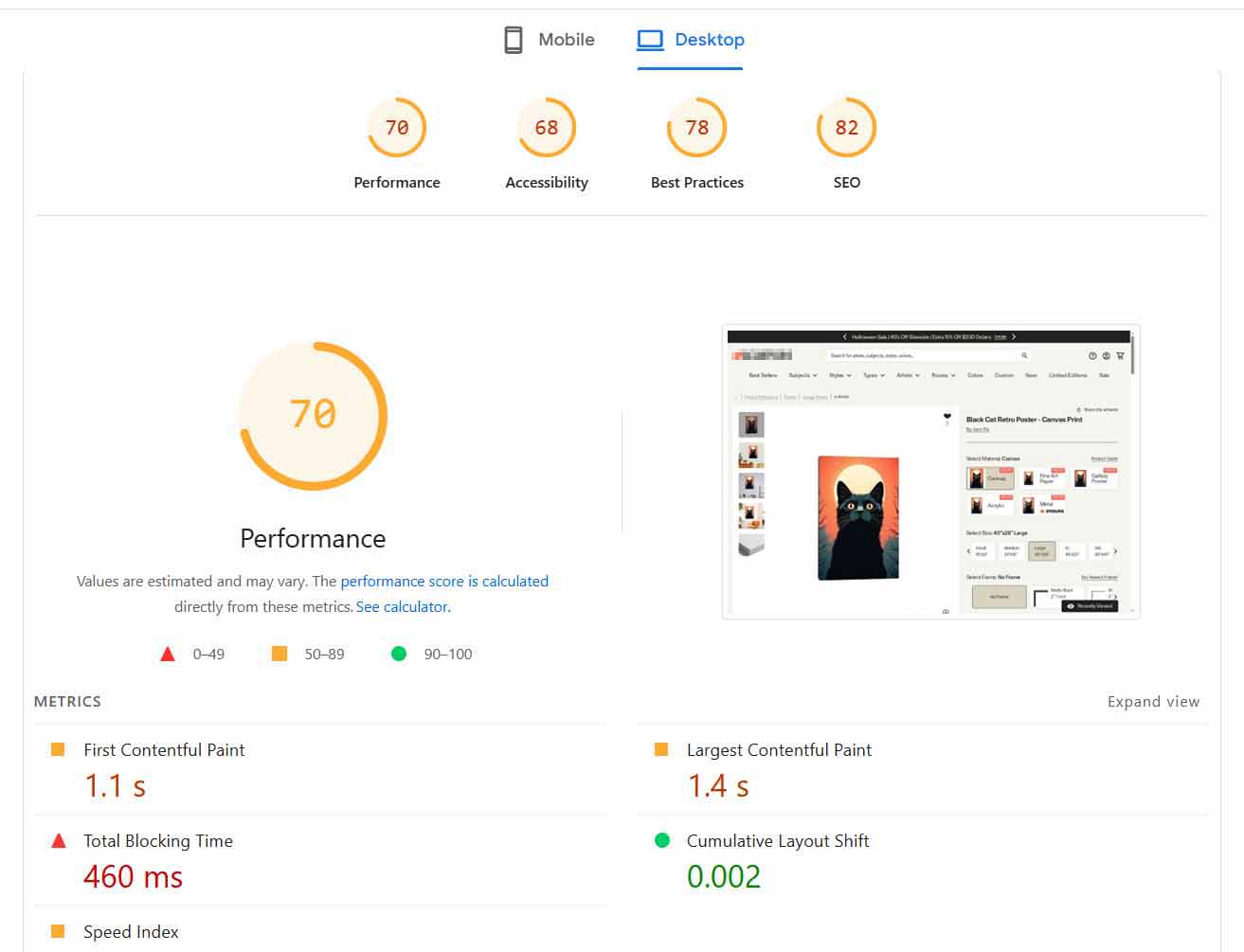
When you run a PageSpeed Insights report, you’ll see two key sections:
SEO Recommendations: These are focused on discoverability, metadata, structure, and accessibility — things like whether your images have alt text, whether your page titles are too long or too short, whether your layout is mobile-friendly, and whether your internal linking structure makes sense. Google even assigns an SEO score from 0 to 100, giving you an at-a-glance sense of how your store performs relative to best practices.
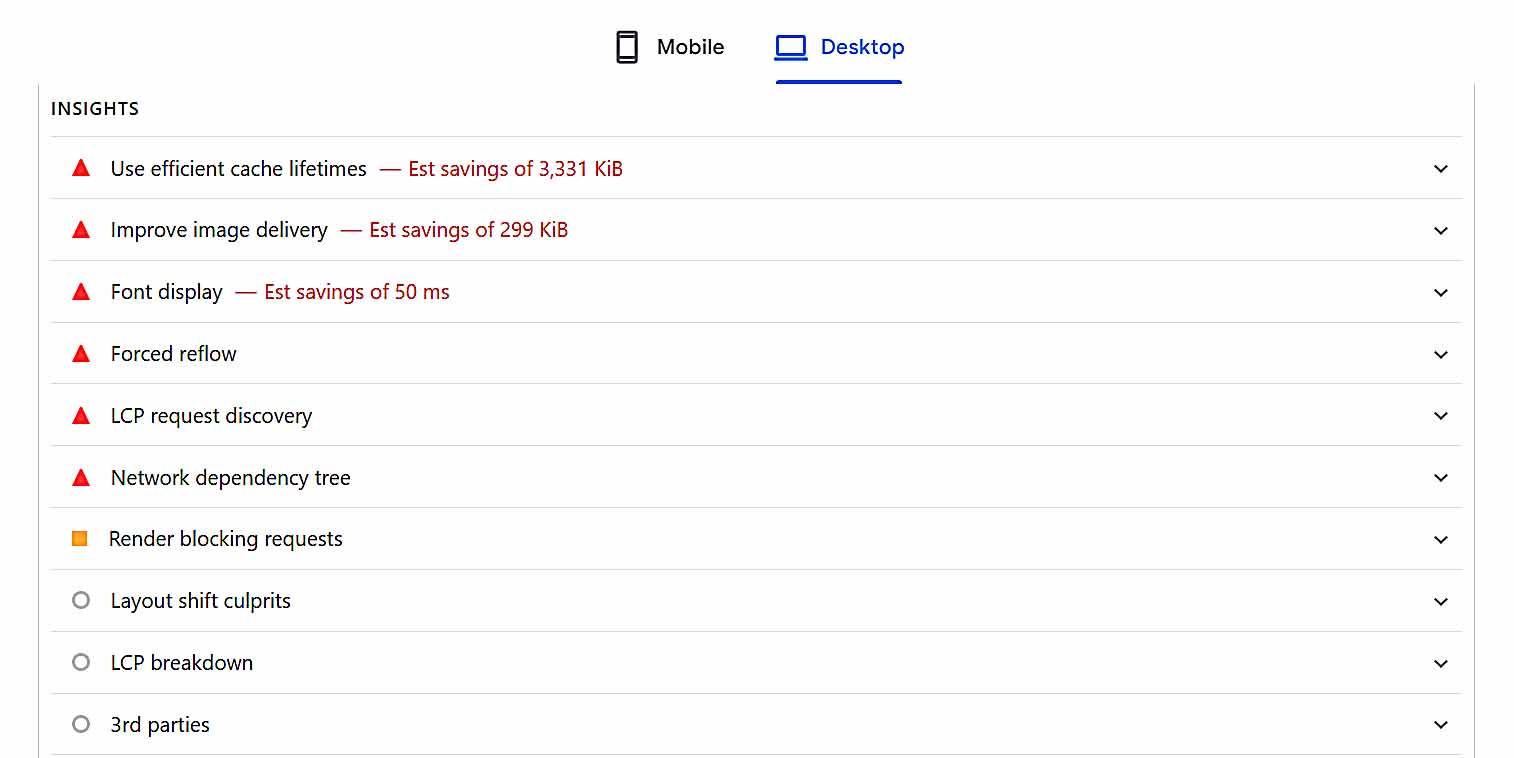
Performance Recommendations: This section focuses on load speed and user experience. Site speed is not only critical for ranking — it also affects whether people stay. A slow site means higher bounce rates, shorter session durations, and lower conversion rates. Search engines monitor all of that. When they see people leaving your site quickly, they interpret it as a sign that your page wasn’t a good match for that search term — which results in your rankings slipping further down the page.
Running your store through this tool is like getting a free consultation directly from Google’s ranking algorithm. Each suggestion is specific to your site’s actual data, so instead of reading general SEO articles and guessing which optimizations apply, you’re working from a tailor-made action list.
Why Speed Matters So Much for POD Sellers
Print-on-demand stores, particularly Shopify-based ones, are extremely image-heavy. Every product page can contain multiple high-resolution mockups, variant thumbnails, and lifestyle images — all of which are great for presentation, but they can drastically slow your load times if not optimized correctly.
This is where PageSpeed Insights becomes doubly valuable: it will highlight exactly which images or scripts are slowing things down, allowing you to take targeted action. And for Shopify users, there’s a perfect solution that handles the entire process automatically.
Spotlight Tool: Crush – Speed & Image Optimizer
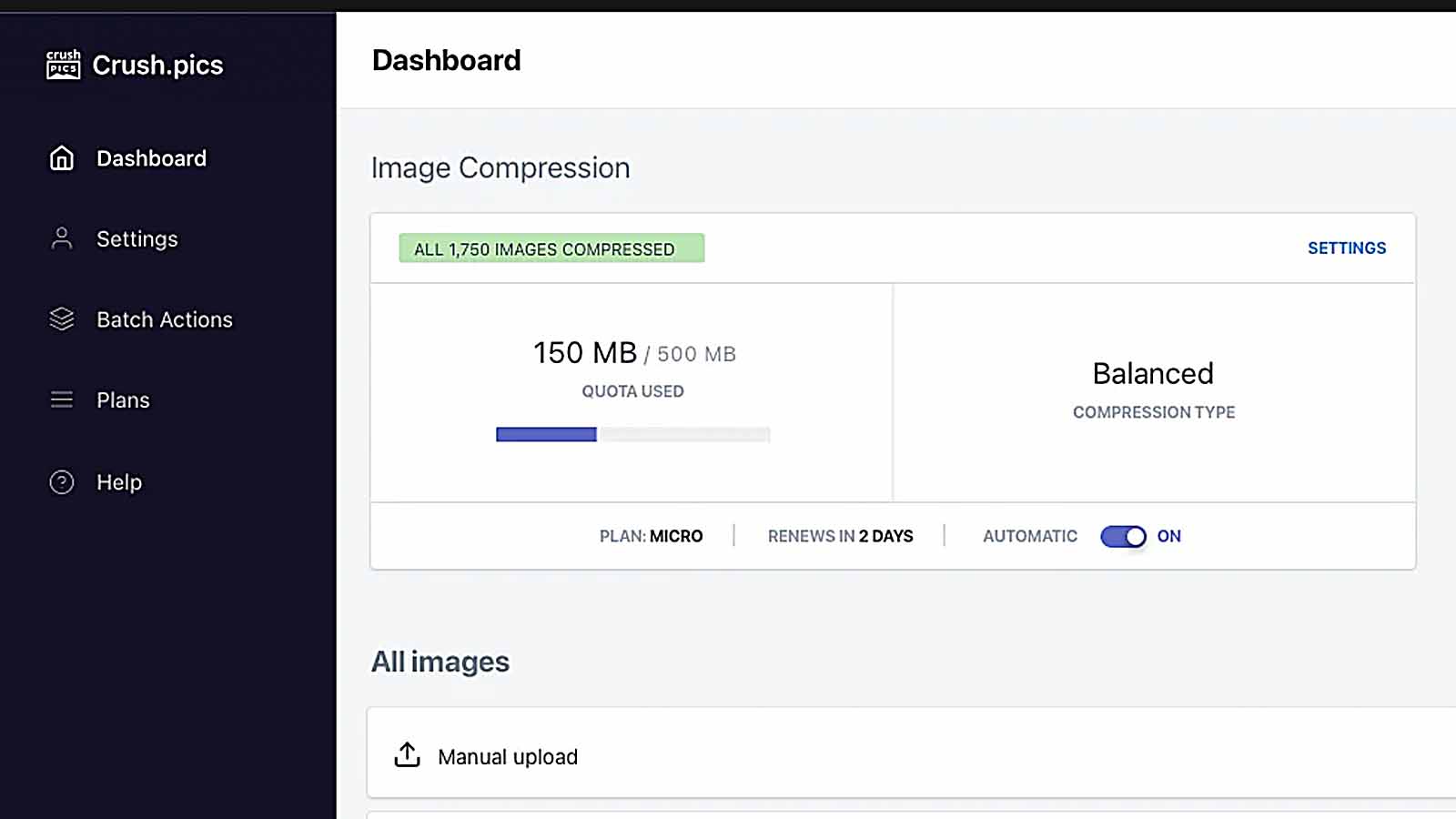
If your PageSpeed report flags “Serve images in next-gen formats” or “Properly size images” warnings, don’t panic. You don’t need to manually resize and re-upload thousands of product images — you can automate the entire process using the Crush: Speed & Image Optimizer app for Shopify.
Here’s what it does:
- Compresses Images Automatically: It reduces the file size of your product images without visibly lowering quality, dramatically improving your site’s load speed.
- Renames Files and Alt Tags for SEO: The app automatically renames image files and alt tags to better describe what’s shown in each image. Search engines use this text to categorize images, so this step helps your visual content rank in image search results and reinforces your on-page keyword targeting.
- Runs in the Background: Once you set your compression and renaming preferences, Crush operates automatically — continuously optimizing new images as you add them.
- Supports Different Compression Algorithms: You can test and choose between compression types, giving you full control over balancing image clarity and file size.
Put simply, Crush eliminates one of the biggest technical headaches for Shopify-based print-on-demand sellers. You get a faster website, better SEO, and an improved user experience without any manual maintenance.
The Bigger Picture
When you combine Google’s diagnostic data with automated tools like Crush, you unlock the ability to make your store not just larger (from your product catalog growth) but also stronger — faster, cleaner, and easier to navigate. A site that loads instantly, keeps visitors engaged, and delivers exactly what they’re looking for will always outperform one that drags, stutters, or feels clunky.
Speed and discoverability aren’t glamorous topics, but they’re the hidden engines behind sustained traffic growth. Improving them can elevate every other strategy you apply — because no matter how brilliant your product catalog or SEO keywords are, they can only work if your store actually ranks and loads fast enough for people to see them.
Traffic-Increasing Strategy #3: Auto-Convert Your Products Into Google Shopping Feed Listings
Up to this point, we’ve focused on optimizing your own storefront for organic discoverability — through more products, better SEO, and higher performance. Now it’s time to expand your reach beyond your own site entirely and tap into one of the largest product discovery channels on the planet: Google Shopping.
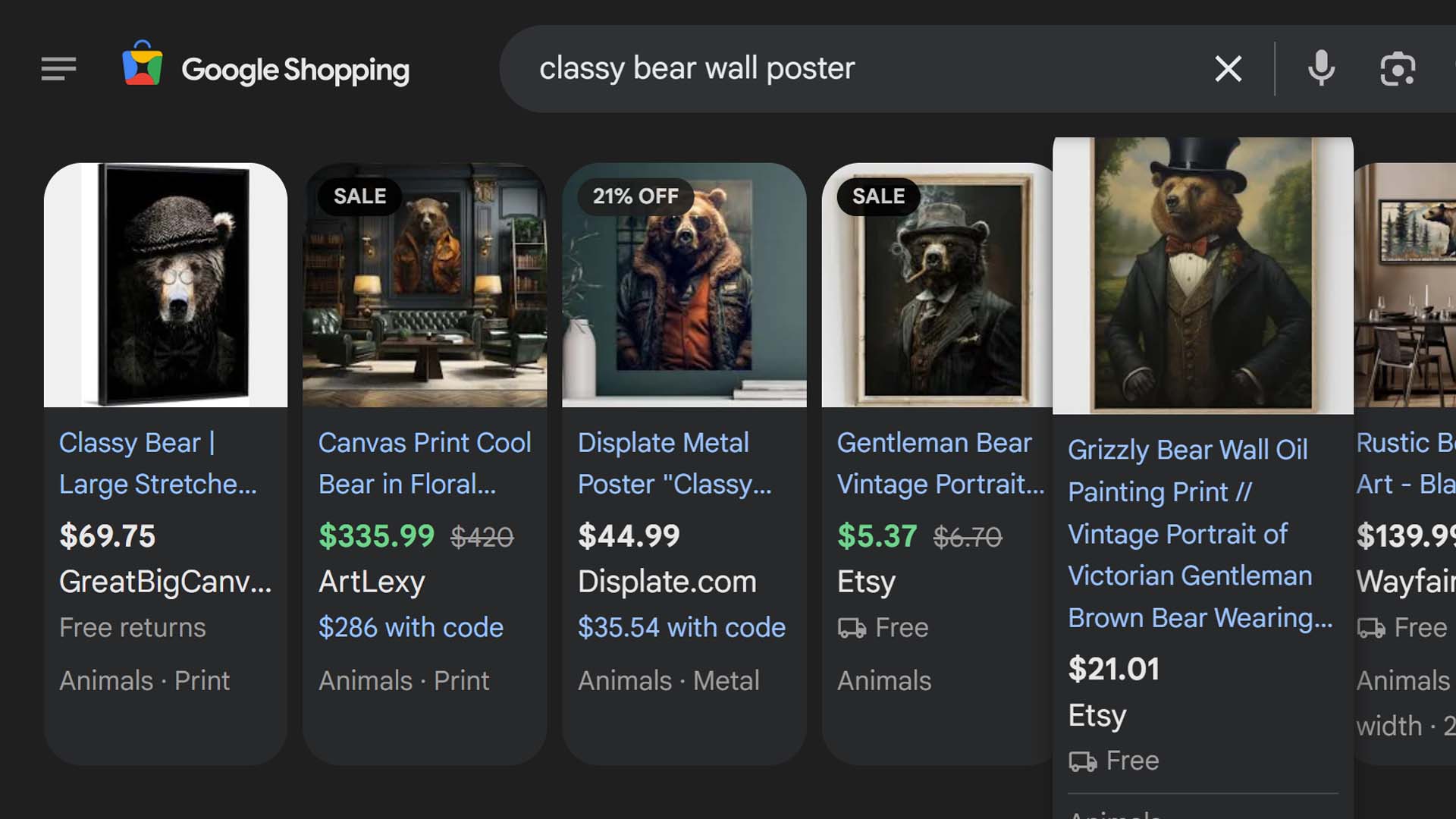
If you’ve ever searched for a product on Google and seen a carousel of product listings with images, prices, and store links at the top of the results — that’s the Google Shopping Feed in action. Those listings pull directly from structured product data that merchants submit to Google, and with the right setup, your print-on-demand products can appear right there alongside every major retailer.
The Easy Way: Use the Simprosys Google Shopping Feed App
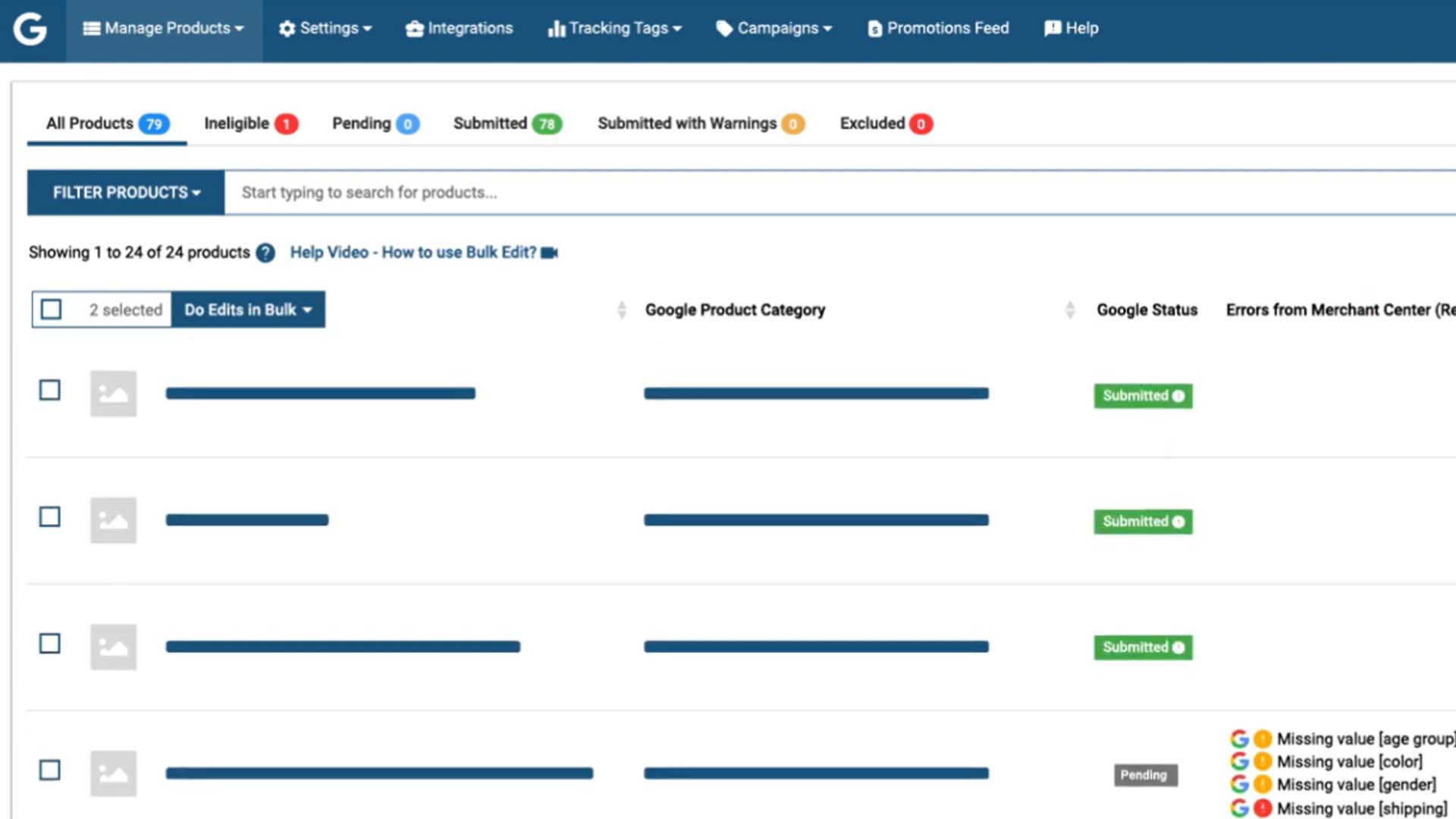
The Simprosys Google Shopping Feed app for Shopify makes this entire process effortless. In plain terms, it takes your entire catalog of Shopify products and automatically converts them into Google Shopping Feed listings — no manual data entry, no complex setup, no technical headaches.
Once configured, every time you add or update a product on your store, the app automatically syncs that change with Google’s Merchant Center. This means your latest artwork, new collections, and seasonal designs can start appearing in the Shopping tab results without you ever having to lift a finger.
The practical outcome is straightforward but powerful:
- Your products can appear not only in regular Google search results but also in Google Shopping listings, where shoppers specifically looking to buy are already browsing.
- You gain access to an entirely new stream of qualified, purchase-ready visitors who are searching with clear buying intent — the kind of traffic that typically converts at far higher rates than general browsing traffic.
What the App Handles Behind the Scenes
The app technically supports dozens of advanced features — product feed submission for Google Shopping, Microsoft Bing Shopping, Facebook and Instagram Shops, Pinterest Ads, and even Google’s Performance Max campaigns. It can manage multi-country and multi-currency feeds, handle automatic category mapping, set up conversion tracking, and create dynamic remarketing tags.
But here’s the key takeaway: you don’t need to understand any of that to get results. For our purposes, all you need to know is that this single app automates the entire “get my products into Google Shopping” process. You install it, connect it, and it does the rest in the background.
Your print-on-demand catalog instantly gains a second front door — one that’s positioned directly in front of millions of buyers who are already searching for the kind of designs you sell.
Why This Matters for Traffic Growth
Think of it this way: when your products only appear in the standard Google text search results, you’re competing against blogs, marketplaces, and other stores for clicks. But when your products also appear in Google Shopping, they show up in a visually rich, product-first format where users can immediately see your image, title, and price.
That dual presence dramatically increases your odds of being discovered. People who might never click a regular search result might instead click a Shopping result because it’s visually appealing and instantly relevant to what they want.
And because the listings are fed directly from your store, they remain perfectly synchronized — if you update your titles, pricing, or descriptions in Shopify, the changes flow automatically to your Google Shopping listings.
The Bottom Line
Using the Simprosys app is one of the simplest “set it and forget it” traffic multipliers available to Shopify print-on-demand sellers. Once installed, it quietly works in the background, keeping your entire catalog mirrored in Google’s Shopping ecosystem.
That means more exposure, more visibility across search formats, and more targeted buyers reaching your products without any ongoing manual effort. For a few minutes of setup time, you unlock an entirely new high-intent traffic channel — and that’s exactly the kind of scalable advantage that compounds over time.
Traffic-Increasing Strategy #4: Auto-Convert Your Products Into Pinterest Pins
Google may dominate text-based search, but when it comes to visual product discovery, Pinterest is the heavyweight champion. It’s one of the most image-driven shopping platforms in the world — millions of users scroll through visuals daily, searching for décor inspiration, artwork ideas, fashion pieces, and gift products. If your store sells anything that looks good (and every print-on-demand product should), Pinterest represents a massive pool of organic traffic waiting to be tapped.
Automate Your Pinterest Exposure With the Pinterest Shopify App
The Pinterest Shopify app makes it possible to turn your entire product catalog into Pinterest content automatically. Instead of spending hours manually uploading product images, writing captions, and linking back to your site, the app handles everything for you.
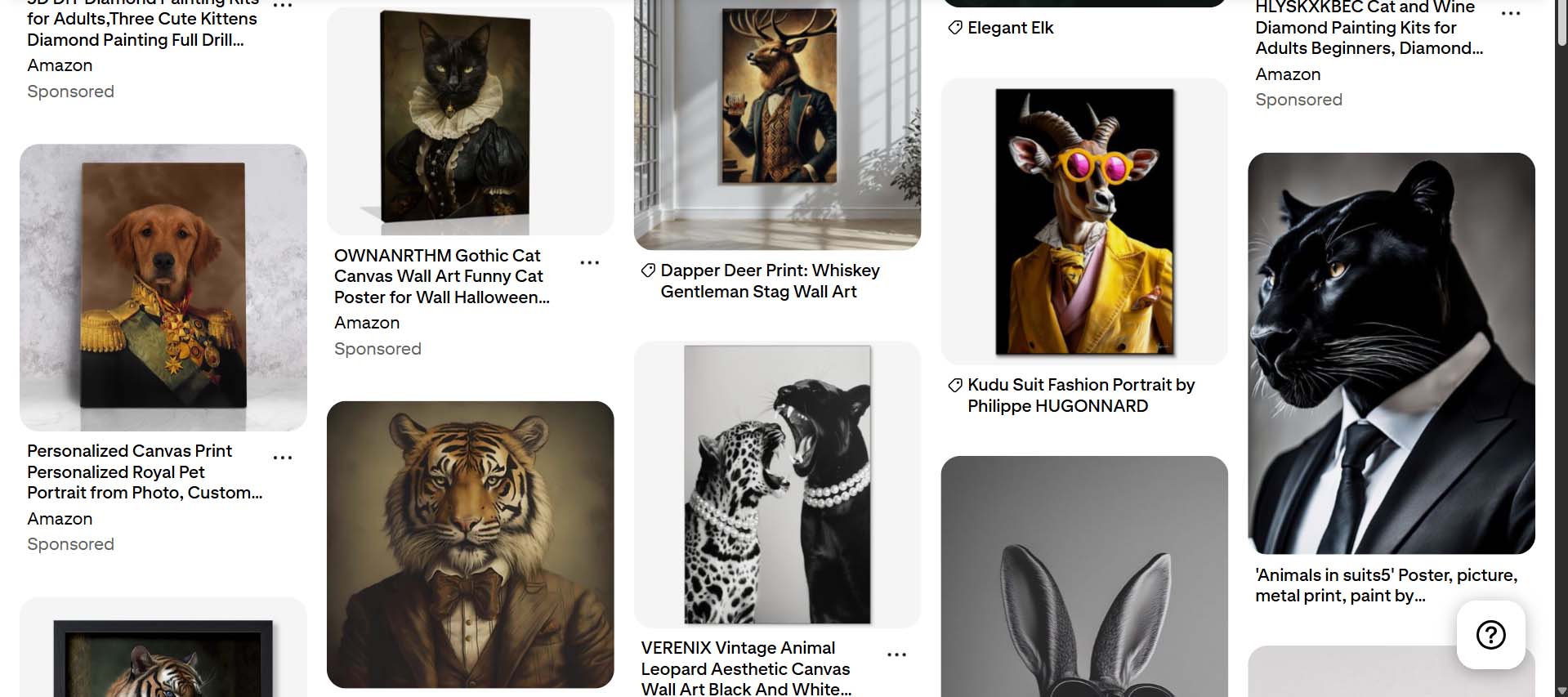
Once installed, it connects your Shopify store directly to your Pinterest account and begins auto-creating Pins for every product in your catalog — complete with your product title, description, image, and a direct link back to your product page.
That means you can instantly have hundreds or thousands of visual “billboards” for your products circulating on Pinterest without any manual effort. Every time you add a new product to your store, a new Pin is created and distributed automatically, expanding your reach across Pinterest’s massive search and recommendation ecosystem.
For print-on-demand sellers, this is pure gold. Pinterest users often search for things like “minimalist wall prints”, “nursery animal posters”, or “abstract geometric art ideas.” Those are exactly the types of keywords your products can match with — and because Pinterest Pins are highly visual, even a single striking image can drive serious click-through traffic to your store.
This is hands-off marketing at scale: your visual assets do the selling for you, 24/7.
The Power-Combo: Pairing Pinterest Automation With the Bulk POD Product Creator
Here’s where things get especially effective. Imagine your product listings weren’t just standard images with generic titles, but AI-optimized listings filled with rich, long-tail keywords that describe each artwork image with precision.
That’s what happens when you use the Bulk POD Product Creator first. Each product it creates comes with an SEO-optimized title, detailed description, and accurate tags — all generated automatically from the AI’s image analysis.
When the Pinterest app then auto-creates Pins from those products, each Pin inherits that same keyword-rich metadata. That means:
- Your Pins show up more often in Pinterest search results because their titles and descriptions are full of high-intent, artwork-specific terms.
- The text associated with each Pin is directly aligned with what users are typing into the Pinterest search bar (for example, “vintage botanical print” or “whimsical nursery animal wall art”).
- The combination of beautiful imagery + precise keyword targeting increases both your visibility and your click-through rate dramatically.
The exact same synergy applies to your Google Shopping Feed setup. When your products are already optimized by the Bulk POD Product Creator — with accurate titles, structured descriptions, and clean metadata — every automated integration you connect (whether Google Shopping or Pinterest) performs exponentially better.
You’re not just broadcasting random products into more channels; you’re broadcasting optimized, intelligently structured listings that are algorithm-ready the moment they go live.
Why This Approach Works So Well
Pinterest’s search engine rewards Pins that combine compelling imagery with clear, relevant descriptions. Most sellers miss that second part — they upload pretty pictures but neglect the SEO foundation. By pairing the Bulk POD Product Creator’s metadata with Pinterest’s automation, you check both boxes perfectly: great visuals and great keyword coverage.
The result is a feed of Pinterest Pins that look beautiful, target the right audience, and link directly to your store’s optimized product pages. Over time, those Pins continue to circulate, get saved to boards, resurface in related searches, and drive compounding waves of referral traffic — all without additional effort on your part.
In other words:
- The Bulk POD Product Creator builds your traffic-optimized products.
- The Pinterest app automatically turns them into perpetual, self-renewing ad units.
- You gain a steady inflow of visual discovery traffic — hands-free.
That’s a win-win-win loop of automation, exposure, and sales — exactly the kind of scalable ecosystem that modern print-on-demand sellers should be striving for.
Conclusion: The Compounding Effect of Applying All These Traffic-Boosting Strategies to Your POD Store
Each of the strategies we’ve discussed — building a massive product catalog, automating bulk creation with the Bulk POD Product Creator, optimizing your site for maximum SEO performance, converting your listings into Google Shopping feeds, and auto-publishing Pins on Pinterest — will absolutely move the needle on its own. But the real magic happens when you implement all of them together.
Traffic growth, like most forms of business growth, is rarely linear. It compounds. When one system feeds another, your results multiply rather than just add up. A larger catalog creates more pages that can rank in search results. Optimized SEO ensures those pages actually do rank. Google Shopping feeds and Pinterest automation distribute that same optimized content to new audiences outside your site. And the traffic those audiences send back further boosts your engagement metrics — which in turn improves your rankings even more.
It becomes a self-reinforcing loop of growth:
- More optimized products → more impressions in Google and Pinterest.
- More impressions → more clicks and site visits.
- More visits → higher session durations and engagement signals.
- Better engagement → higher search rankings.
- Higher rankings → even more traffic, visibility, and sales.
When you run all four strategies in parallel, you’re no longer hoping for a viral moment or chasing a one-off ad campaign. You’re building a machine — a scalable system that continues to generate organic traffic day after day, month after month, without constant reinvention or ad spend.
And the benefits don’t stop at traffic. The ripple effects across your entire print-on-demand business are enormous:
- You gain faster data on what designs sell best.
- Your catalog becomes more diverse, appealing to broader audiences.
- Your brand authority grows as search engines begin to associate your store with depth, quality, and activity.
- Your average order values climb as customers discover multiple pieces they love.
- Your profit margins improve as more traffic converts organically instead of relying solely on paid ads.
In short: don’t pick just one of these methods — stack them. Each strategy amplifies the others, and together they create exponential growth potential that simply isn’t possible through manual effort or isolated tactics.
By combining automation, AI, and smart distribution, you transform your store from a small side project into a true engine of passive, scalable traffic. The systems do the heavy lifting; you reap the rewards.