How To Create Multiple Printify Products At Once (Instead of 1-By-1)
Overview: Most sellers still build Printify listings by hand—clicking through variants, sizing artwork, and typing product info one at a time. This guide shows a faster approach: bulk-creating Printify products in a single run using a rules-driven workflow powered by the
Bulk POD Product Creator. We’ll cover the pain of manual creation, a simple step-by-step solution (store connection, Example Product cloning, image placement rules, and AI-written titles/descriptions/tags), saved operations for different product types, the downsides of 1-by-1 creation, and the advantages of automating bulk Printify product creation.
The Problem: Creating Printify Products One-By-One is Slow, Repetitive, and Boring
If you’ve ever tried to build out your catalog in Printify the “normal” way, you already know the pain. The process goes something like this:
Open Printify and hunt down the product you want to create.
Select the specific variants (sizes, colors, styles).
Upload your artwork image and wait for it to process.
Position and resize the design for every variant to make sure it looks good.
Manually type in titles, descriptions, and tags for SEO.
Set the prices for each variant.
Repeat all of these steps again—for the next product.
And again. And again. And again. For dozens or hundreds of products, one after the other...
It’s not just slow—it’s mind-numbing. Each product might take 15–30 minutes of careful clicking, dragging, typing, and double-checking. Multiply that by dozens (or hundreds) of designs, and you’re looking at days or even weeks of manual grind.
This is the bottleneck that keeps most Printify sellers stuck. You spend more time clicking around in Printify’s interface than you do on the high-value work that actually grows your business, like designing new artwork, testing ads, or building your brand presence.
Wouldn’t it be better if, instead of creating products one by one, you could just define the rules once and generate dozens—or hundreds—of Printify products in bulk? That’s exactly what’s possible with the approach we’ll cover in this post.
The Solution: Create Multiple Printify Products At Once Using This Simple Process
You start by selecting an “Example Product” in your store. This serves as the blueprint for your new products—carrying over variants, pricing, and other settings.
Step 2: Define Image Placement Rules
Decide how your artwork should be applied: stretch-to-fit, preserve aspect ratio, or exactly match an example. The software will then automatically resize and position your designs accordingly.
Step 3: Upload Your Artwork Images
Drop in a folder of designs you want turned into products. Each image will become its own fully configured listing.
Step 4: Generate SEO Metadata Automatically
The tool writes keyword-rich titles, descriptions, and tags for every new product using AI—so your listings don’t just exist, they’re optimized to rank.
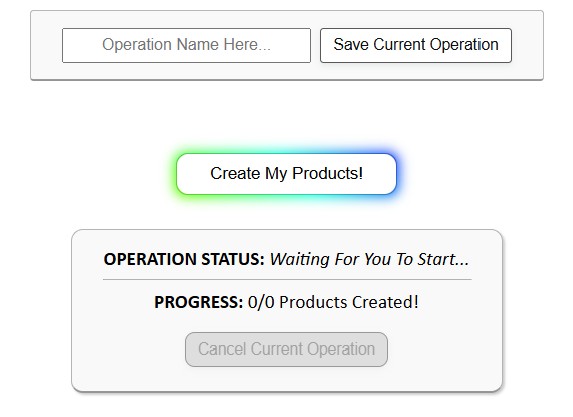
Step 5: Click “Create My Products”
The system clones your Example Product, inserts your artwork, applies your SEO rules, and creates dozens or even hundreds of products automatically.
Saving and Loading Operations
One of the most powerful features here is saved operations. Let’s say you sell multiple categories of POD products: t-shirts, sweatshirts, posters, mugs. Instead of re-building your workflow every time, you can:
Save each product type with its own optimized setup.
Load the setup from a dropdown menu in one click.
Drop in your next batch of artwork.
Click “Create My Products” again.
This lets you create an entire catalog in streamlined “lanes.” One batch of t-shirts, one batch of sweatshirts, one batch of posters—each following the exact formatting, SEO rules, and placement standards you’ve defined.
The result is simple: minimal effort on your part, maximum catalog growth for your store.
The Downsides of Creating Your Printify Products Individually
On the surface, creating products one at a time might feel manageable. But once you scale beyond a handful of designs, the cracks show fast:
It’s a massive time sink. Each product can take 15–30 minutes to set up. Multiply that by 50, 100, or 500 designs, and suddenly weeks of your life are spent on tedious clicking and typing.
You’re stuck doing low-value work. Every minute spent resizing images and typing descriptions is a minute not spent on designing, marketing, or improving your store’s growth engines.
Your store’s growth is capped by your available hours. If you can only create 10 products in a day, then your catalog expands at a snail’s pace, no matter how many designs you have ready.
The process is error-prone. Manually entering data for every product increases the risk of typos, mispriced variants, or inconsistent formatting.
SEO takes a back seat. Writing keyword-rich titles, descriptions, and tags gets exhausting after the first dozen products, which means most sellers cut corners—leading to poor search visibility and missed traffic.
The boredom kills momentum. Staring at the same screens and repeating the same steps over and over is draining. Many sellers stall out halfway through building their catalog simply because the grind is unbearable.
The result? A store that grows slower than it should, with fewer products, weaker SEO, and more frustration than necessary.
Automation flips the script. Instead of being limited by how fast you can click, your output is limited only by how many designs you have ready. With the Bulk POD Product Creator, you gain:
Enormous time savings. Create hundreds of products in hours, not weeks.
Consistent, professional outputs. Every listing follows the same high-quality structure for titles, descriptions, tags, and formatting.
SEO built-in. AI-generated product info ensures each listing is keyword-optimized, capturing long-tail queries and driving more organic traffic.
Rapid catalog expansion. Grow your store footprint dramatically, which means more opportunities for customers to find and buy your products.
Error-free workflows. Automation ensures variants, prices, and placements are cloned accurately from your Example Product.
Saved operations for future use. Build repeatable workflows for different product types—t-shirts, posters, hoodies, mugs—and launch new batches with just a few clicks.
More time for high-value work. Instead of grinding through uploads, you can focus on design, ads, partnerships, or other income-generating projects.
In short, automation doesn’t just save you time—it transforms your business into a scalable machine that compounds growth the more you use it.
Conclusion
Printify is a powerful platform for POD sellers, but its product creation process wasn’t designed for scale. Creating listings one by one is fine for a hobby store—but it’s a brick wall for anyone serious about growing a real business.
Manual = slow, repetitive, error-prone, and exhausting.
Automated = fast, consistent, scalable, and profitable.
If you’re serious about building a POD business that grows quickly and sustainably, automation isn’t optional—it’s the key. With the right tools in place, your store keeps growing even when you’re not grinding at the keyboard.