
Bulk Product Import Tool For Printify: Create 100s of New POD Products Fast
Overview: Learn how the Bulk POD Product Creator automates bulk product import for Printify. This powerful automation tool lets you create hundreds of new POD products quickly, with perfect SEO, variant, and pricing configuration—no spreadsheets or manual work required.

The Problem – Creating Printify POD Products One at a Time Is a Slow, Boring Process
Every print-on-demand seller has faced it: the soul-crushing monotony of creating Printify products one by one. You click through the same menus repeatedly—selecting the same product, re-uploading images, resizing artwork, writing new titles, rewriting descriptions, adjusting placements, setting prices—all while knowing you’ll have to do it again for the next design.
Even if you’re fast, it still takes around 15–20 minutes per product to do properly. Building a modest 200-product catalog can easily cost you 60+ hours of pure manual clicking and typing—and that’s before you even start marketing or optimizing anything.

This repetitive grind not only drains your time but also stifles your ability to scale. Every hour spent babysitting uploads is an hour you’re not building your audience, experimenting with new products, or growing your revenue. And ironically, the more successful your store becomes, the worse the problem gets—because scaling a manual workflow only multiplies the drudgery.
Printify’s interface was never designed for bulk productivity. It’s excellent for testing individual designs—but a bottleneck for anyone who wants to publish 100, 500, or 1,000 products efficiently.
That’s exactly where automation changes the game.
The Solution – Bulk-Import All Your New POD Products Automatically
Enter the Bulk POD Product Creator—an automation solution that effectively acts as your personal product factory. Instead of you manually creating listings one at a time, the tool automatically imports all your selected artwork images into your Printify account and generates complete, ready-to-publish products for each one.
Think of it as a true bulk product importer for your Printify POD store—one that doesn’t rely on clunky spreadsheets or manual setup.

Here’s what happens under the hood:
- You define the Example Product that serves as your template. This includes all the variants, pricing, and provider selections you want replicated.
- You select the artwork images you want to turn into products.
- The tool runs the operation automatically—uploading each image, applying your configured placement rule, generating SEO-optimized metadata (titles, descriptions, and tags), and publishing each finished product to your store.
From a technical standpoint, the system connects to Printify’s API and executes a structured series of automated operations—each one mirroring the process of manually creating a product but executed programmatically, at scale, and with zero mistakes.
It essentially transforms your creative workflow into an assembly line—importing one product after another on autopilot while you focus on strategy, marketing, or new designs.
This bulk-import functionality isn’t just about speed—it’s about liberation. Instead of wasting your energy on low-leverage tasks, you let automation handle the repetitive mechanics while you focus on the high-value work that actually drives revenue.
Why This Tool Is Simpler Than CSV-Based Import Methods
If you’ve ever attempted a bulk import using a CSV file, you already know how painful it can be.
Traditional spreadsheet-based import methods look efficient on paper but are notoriously finicky in practice. They require you to:
- Build a CSV file with exactly correct column names and data structures.
- Manually input or copy-paste dozens of product details line by line.
- Format every field precisely to match Printify’s naming conventions.
- Handle variant configurations, artwork file URLs, and pricing columns manually.
- Run multiple failed imports due to syntax or formatting errors—and then go back, fix, and retry until it finally uploads successfully.
Even for experienced spreadsheet users, this process is fragile and time-consuming. You spend as much time managing the CSV file as you would just manually creating the listings inside Printify.
By contrast, the Bulk POD Product Creator eliminates that entire layer of complexity. There’s no spreadsheet, no formatting rules, no column-mapping, and no trial-and-error guessing games.
Instead:
- You configure your Example Product one time inside Printify—setting up the variants, pricing, and print provider you prefer.
- You select the batch of artwork images you want to import.
- The software automatically creates new POD products for each of your artwork images—applying your Example Product’s settings, positioning each artwork automatically, and generating all metadata (titles, descriptions, tags) on the fly using AI.
It’s the difference between juggling a fragile CSV document and pressing one button to run an entire automated operation.
Where a CSV-based bulk import feels like a technical chore, this tool feels like flipping a switch—and watching 100+ new products seamlessly import into your Printify store in minutes.
In short: this is true bulk importing, powered by automation, intelligence, and with zero friction.
Bulk Product Import Settings You Can Configure
The beauty of this tool lies in how customizable it is. Every seller runs their store differently, and this importer adapts to fit your exact workflow. You can control exactly how each product gets created, what metadata gets attached, and how every artwork image is positioned, priced, and published—all through an intuitive interface that eliminates the need for messy spreadsheet setup.
Below are the key configuration options that define how your bulk import operations behave.
1. Artwork Placement Rules
When you bulk-import your print-on-demand products, each artwork image must be positioned correctly within the print area for every variant—and this is where the tool’s intelligent placement system comes in.

You can choose from three different placement modes:
- Stretch Images To Fit Print Area(s): Ensures the entire print area is completely covered, even across different product aspect ratios. Ideal for all-over designs or full-frame artwork like wall art and canvas prints.
- Preserve Image Aspect Ratio & Center: Keeps the original proportions intact while centering the image perfectly in the print area. Perfect for photography, framed prints, or t-shirt designs that shouldn’t be distorted.
- Exactly Match Example Image(s): Replicates placements exactly as defined in your Example Product—pixel for pixel. This option is great for specialized products such as mugs or shoes that require precise image positioning.
The importer applies these rules automatically to each image in your batch. You configure it once, and the tool does all the resizing, repositioning, and alignment work behind the scenes—ensuring every new product looks flawless across all variants.
2. Product Variants and Pricing
When you manually configure products, choosing variants and setting prices can take forever—especially when a single product type (like canvas prints or hoodies) has dozens of variant combinations.
This tool eliminates that burden entirely. It clones the variant selections and pricing rules directly from your Example Product—meaning you configure them once inside Printify, and every subsequent product follows those same settings automatically.

That includes:
- Which sizes, colors, or frames to offer.
- The price assigned to each variant.
- Which print provider to use (if multiple options exist).
Every imported product is built with perfect consistency—no missing variants, no mispriced listings, no manual data entry.
3. Product Titles
Your product titles play a massive role in search visibility and buyer engagement. The importer gives you several ways to handle title generation:
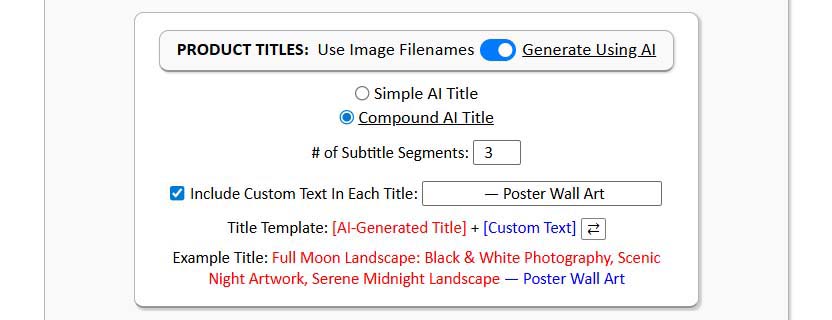
- Default Option: Use the filename of your artwork image as the product title (great for fast imports where filenames are already descriptive).
- AI-Generated Titles: Automatically generate titles using AI image recognition and natural language generation. The AI analyzes each image, identifies what’s depicted, and writes concise, SEO-optimized titles that describe the artwork accurately.
- Simple vs. Compound Titles: Choose between concise visual-descriptor titles (simple titles) or longer, keyword-rich titles that include a specified number of additional subtitle segments (compound titles).
- Custom Text Appending/Prepending: Add optional prefix or suffix text to every title automatically—for instance, “Modern Abstract Painting—Canvas Wall Art” or “Vintage Nature Photography—Framed Print.” This combines artwork-level detail with product-level keywords, a powerful SEO combination.
This flexibility means you can scale fast without losing control over your brand voice, title structure, or search optimization.
4. Product Descriptions
Writing compelling, unique product descriptions for hundreds of products is one of the most exhausting manual tasks for POD sellers. The importer solves this with built-in AI generation.

Each artwork image is analyzed using image-recognition models, and a descriptive, keyword-rich product description is written automatically. You can configure:
- Description Length: Choose between short, medium, or long descriptions (e.g., 1–3 paragraphs).
- Custom HTML Additions: Append standardized HTML blocks to every imported product, such as material specifications, shipping notes, or brand story snippets.
- Consistent Formatting: Maintain a professional, polished structure across all product pages.
Because the AI generates unique text for each image, you end up with a diverse, SEO-optimized catalog that appeals to both algorithms and human shoppers.
5. Product Tags
Tags improve product discoverability inside marketplaces like Etsy or Shopify, and they’re an important part of any SEO strategy. The importer handles them automatically, too.
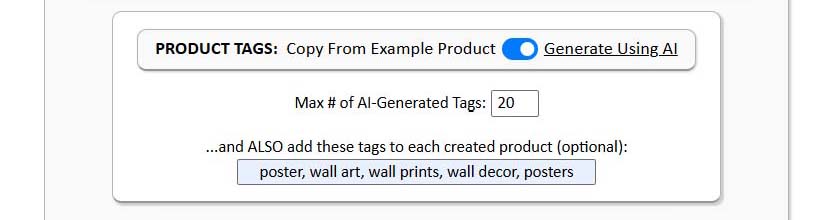
- AI-Generated Tags: For each image, the tool generates a list of accurate, contextually relevant tags—covering the artwork’s subject matter, theme, color palette, and style.
- Custom Tags: You can also specify additional tags that should be included in every product, such as brand-level or collection-level terms.
This ensures every product has a rich, varied, and accurate tag set—automatically expanding your keyword footprint across hundreds of listings.
Core Benefits of Using This Tool
Using this bulk Printify import tool doesn’t just make life easier—it completely changes how you operate as a Printify seller. Here’s what you gain by switching from manual listing creation or spreadsheet uploads to automated bulk import operations:
- Save Massive Amounts of Time: What used to take weeks of manual work can now be done in hours. Import hundreds (or even thousands) of products in one operation, without touching a single CSV cell or spending your day in the Printify UI.
- Fully Automated, Hands-Free Execution: Once you configure your Example Product and select your images, the importer handles everything automatically—uploading, generating titles/descriptions/tags, setting prices, and finalizing product listings. It’s a true “set it and forget it” workflow.
- SEO Optimization at Scale: AI-driven titles, descriptions, and tags ensure every single product you import is keyword-optimized for maximum visibility. The system generates unique metadata per image, reducing keyword overlap and improving organic traffic potential.
- Zero CSV Complexity or Setup Errors: Forget about matching column headers, fixing syntax issues, or manually mapping product attributes. The tool does all the structural work behind the scenes, meaning zero spreadsheet hassle and zero risk of import failure.
- Consistency Across Your Catalog: Because all new products are cloned from your Example Product, every listing has perfect consistency—pricing, variants, placement rules, and formatting. This makes your storefront look professional and cohesive, improving trust and conversion rates.
- Scalable for Any Store Size: Whether you’re adding 50 designs or 5,000, the importer scales effortlessly. It adheres to Printify’s API limits automatically, so you can queue large operations safely without worrying about errors or throttling.
- Higher Creative Throughput: With the boring operational work removed, you can focus on creating more artwork, experimenting with new collections, and refining your marketing strategy—the tasks that actually grow your business and income.
- Reusable Saved Operations: Once you’ve configured your ideal settings, you can save that operation and reload it anytime. It stores all your configuration details—placement mode, AI preferences, custom text, tags, and HTML blocks—so future imports require only a few clicks.

Conclusion – The Smarter Way to Build a Printify Catalog
For most print-on-demand sellers, the hardest part isn’t coming up with artwork ideas—it’s the execution bottleneck. Turning those ideas into finished, published Printify products has always been the slowest, least scalable part of the process.
The Bulk POD Product Creator removes that bottleneck completely. It transforms what used to be hours of manual uploads, configuration, and writing into a single automated operation that runs in the background while you focus on growing your business.
No spreadsheets. No formatting errors. No repetitive clicking or typing. Just a clean, efficient system that imports every image as a fully finished, SEO-optimized product—automatically.
Whether you’re launching your first 100 designs or expanding a 10,000-product catalog, this tool delivers what every serious POD seller needs: speed, precision, and scalability.
With automation doing the heavy lifting, your workflow evolves from “create and upload” to “plan and scale.”
Your time becomes leverage—and your store becomes a true digital production line that never slows down.