
Automating Printify SEO With AI-Generated Titles, Descriptions, and Tags
Summary: If you’re building products one-by-one and word-smithing every title, description, and tag, you’re spending your most valuable resource—time—on the least scalable part of your workflow. This guide shows you how to automate Printify SEO using AI—specifically with the Bulk POD Product Creator—so every listing is published with clear, accurate, keyword-rich copy that boosts discoverability and conversions.
Overview: Automating Printify SEO with the Bulk POD Product Creator
The Bulk POD Product Creator is built to solve one of the most frustrating bottlenecks for print-on-demand sellers: creating SEO-optimized product listings at scale. Instead of manually typing titles, writing descriptions, and brainstorming tags for every single design you upload, the tool uses AI to generate keyword-rich, accurate, and consistent product information automatically. Each listing gets a strong, descriptive title, a clear and specific description, and a focused set of tags—all aligned with best practices for search engine discoverability. The result is that your Printify catalog not only grows faster, but every product also has a better chance of ranking in search results and attracting organic traffic, without the time-sink of manual SEO work.
Why SEO for Printify products starts with the title
Search engines don’t treat all on-page text equally. Your product title (often rendered as the page’s <h1>) is the single strongest signal of topical focus. Think of it as owning 50–70% of your “SEO budget” for the page.
What strong titles do:
- Name the product type (“poster,” “canvas,” “wall art”)—be explicit; search engines can’t infer it from a mockup.
- Describe the image content with specific, concrete terms (subject, style, medium, colors, scene).
- Target multiple closely related queries (without keyword stuffing).
What weak titles do:
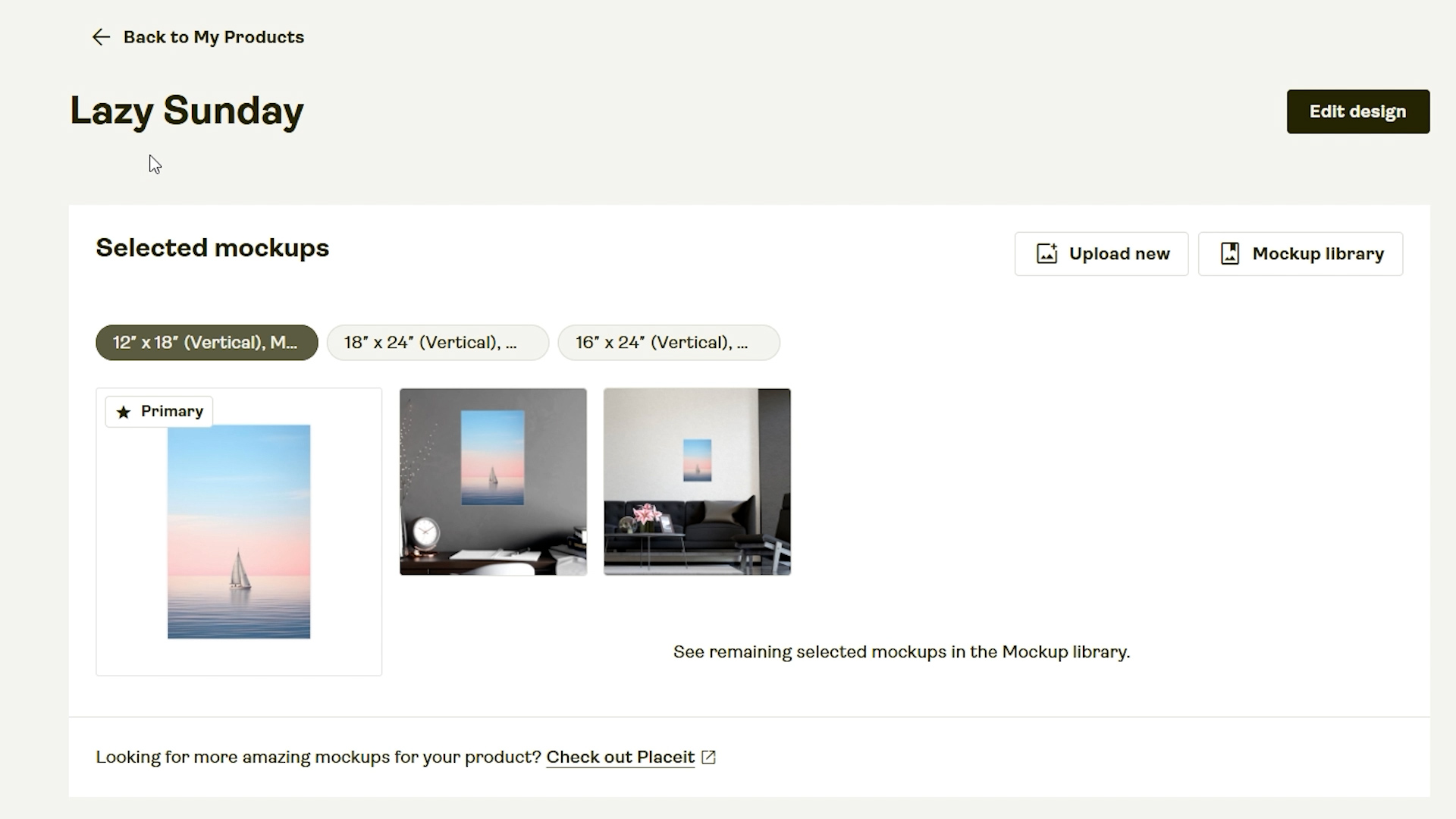
- Use vague, poetic names (“Lazy Sunday”) that match no buyer intent.
- Omit the product type entirely.
- Spray unrelated keywords.
Rule of thumb: If someone typed your title (or a close variant) into a search engine, would your product be a great result? If yes, you’re on track.
Bad Product Title Example, For SEO:
Good Product Title Example, For SEO:
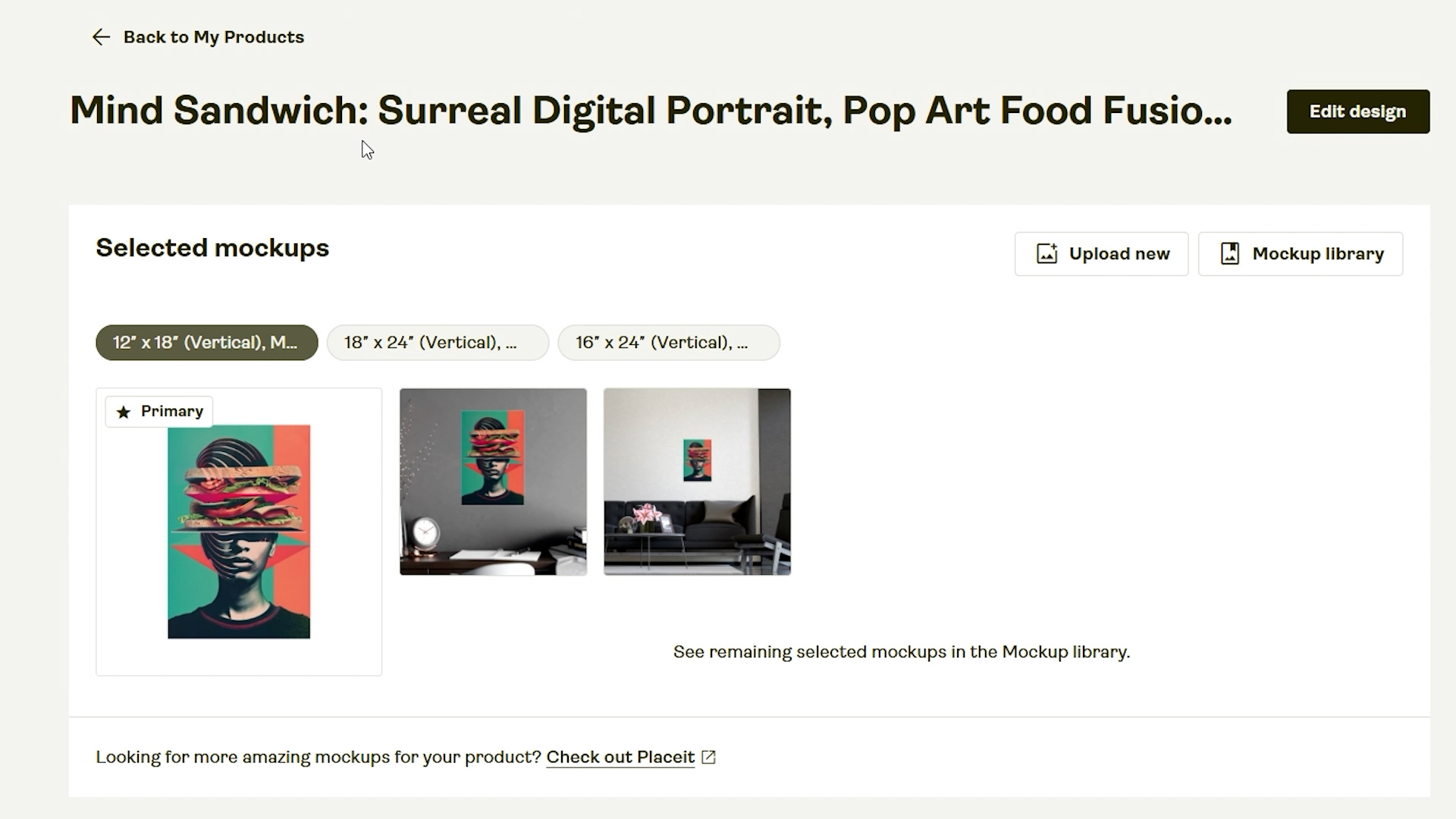
Descriptions that help (without rambling)
Descriptions don’t need to be essays. One or two tight paragraphs that describe exactly what the image contains, the aesthetic, and optionally use-case context (“modern office wall art,” “nursery décor”) are enough. Save generic manufacturing details (paper weight, finish, frames) for a short boilerplate block at the end.
Avoid:
- Metaphors and vague inspirational prose.
- Laundry lists of barely related keywords.
Aim for:
- Clear content descriptors (subject, composition, palette).
- Style and medium terms buyers actually search (surreal, minimalist, watercolor, pop art, etc.).
- Optional room or intent terms (“living room wall art,” “gift for hikers”).
Good Product Description Example, For SEO:

The manual approach vs. automation
Manual: Upload an image → adjust placement per variant → craft a title → write a description → think of tags → repeat 100+ times → fight inconsistency and fatigue.
Automated with The Bulk POD Product Creator:
- Point the tool at a folder of images.
- Select an example product (your blueprint for variants and print areas).
- Choose placement logic (Stretch / Preserve & Center / Exactly Match Example).
- Configure AI rules for titles, descriptions, and tags.
- Click Create My Products and watch a complete, SEO-ready catalog appear.
Result: A consistent, accurate, search-friendly product set—produced in a single run.
The Bulk POD Product Creator takes the slow, manual Printify workflow and turns it into a repeatable automation. Instead of uploading one image at a time, adjusting its placement on every variant, and then racking your brain to write a unique title, description, and set of tags for each product, you simply point the tool at a folder of artwork, choose one example product as the blueprint, and set a few rules for how content should be generated. The software then creates every print-on-demand product for you in bulk—copying the structure of your example product, placing your images consistently, and using AI to generate SEO-optimized titles, descriptions, and tags. The end result is a catalog of products that are ready to sell, built in minutes instead of hours, with consistency and accuracy that’s nearly impossible to maintain by hand.
How the Bulk POD Product Creator automates SEO (the parts that matter)

1) AI-generated product titles (Simple vs. Compound)
- Simple titles: Concise, category-aware. Use when: your filenames already carry information, or for minimalist catalogs.
- Compound titles: Multi-segment titles that include subject + style/medium + product type (and optionally color/scene/room). You choose the number of segments.
Recommended template:
[AI-Generated Title] — [Product Type / Category Suffix]
Examples:
- Surreal Astronaut on Motorcycle, Psychedelic Space Art — Poster Wall Art
- Minimalist Desert Sand Dunes, Golden Hour Photography — Canvas Wall Art
Practical tips
- Set a consistent suffix (e.g., “— Poster Wall Art” or “— Canvas Print”).
- Batch by aspect ratio so AI’s content summary aligns with the print areas you’re using.
- Use Compound mode when targeting long-tail queries; it covers multiple precise intents without stuffing.
2) AI-generated descriptions (with your HTML boilerplate)
- Paragraph count: 1–2 is ideal. More text won’t meaningfully improve ranking and can dilute focus.
- Custom HTML: Append a standardized block covering paper/finish, frames, shipping, care, or size chart links. The tool places your boilerplate after the AI paragraph, so your unique content leads.
Recommended structure
- AI paragraph: Plain-English description of the image content, style, palette, and intended space.
- Boilerplate (HTML): Materials, finish, sizing, fulfillment notes.
Why this helps
- The first paragraph signals relevance for search.
- The boilerplate improves conversion and answers common buyer questions—without mixing generic copy into the core SEO paragraph.
3) AI-generated tags (with caps + evergreen tags)
- Max tag count: Set an upper limit (e.g., 15–20).
- Evergreen tags: Append a short, fixed set (e.g.,
poster,wall art,art print,home decor) across the batch. - AI-tags: Let the model infer subject/style/color terms from the image content.
Outcome: Tight, consistent tag sets that improve store-level search without keyword sprawl.
What it feels like to do this boring, repetitive, SEO work manually (instead of automating it):

A practical, repeatable SEO setup (checklist)
- Batch images by aspect ratio (2:3, 1:1, 4:5, etc.).
- Choose an example product that already has correct variants, prices, and print areas.
- Titles: AI → Compound; add a consistent suffix (“— Poster Wall Art”).
- Descriptions: AI paragraph (1–2) + your Custom HTML boilerplate.
- Tags: cap AI tags (e.g., 20) + 4–6 evergreen tags.
- Save Operation with a clear name (e.g., “Posters 2:3 — Compound x3 — AI Tags 20”).
- Create My Products → spot-check 3–5 outputs → run full batch.
Examples (How the Bulk POD Product Creator's outputs align with best SEO practices)
Example A:
Title: Fragmented Identity, Surreal Pop Art Portrait, Colorful Face Segmentation — Poster Wall Art
Description (AI): “Striking digital artwork blending surrealism and pop art, featuring a segmented portrait in vibrant coral, magenta, and teal...”
Tags (AI + evergreen): surreal portrait, color bands, abstract face, geometric shapes, poster, wall art, art print, etc.
Example B:
Title: Cosmic Rider, Astronaut Motorcycle Adventure, Psychedelic Space Art — Poster Print
Description (AI): “Futuristic digital illustration of an astronaut riding through neon space, ideal for gaming rooms and modern decor...”
Tags (AI + evergreen): astronaut art, motorcycle, psychedelic, sci-fi, poster, wall art, etc.
Guardrails: How to avoid SEO pitfalls at scale
- Don’t keyword-stuff. Use 2–4 semantically tight segments in titles.
- Stay literal. Describe exactly what’s in the image; skip poetic phrasing.
- Keep descriptions compact. Two short paragraphs max; lead with the image content.
- Standardize suffixes. Pick one product-type suffix per category and stick to it.
- Spot-check. Review a handful of outputs from each batch for accuracy before scaling.
The ROI case for automating Printify SEO
- Hours saved: Replacing manual copywriting for 100–500 products can save dozens of hours per collection.
- Consistency: Standardized patterns reduce errors, mislabeling, and “one-off” deviations.
- Throughput: Faster time-to-shelf means you can test more designs and niches.
- Compounding effect: Every accurate page you publish expands your long-tail surface area.
Frequently asked questions about using the Bulk POD Product Creator for SEO:
Can I reuse my exact SEO setup with the Bulk POD Product Creator?
Yes. Save your configuration as a Saved Operation and reload it for future batches.
Can I include my own custom HTML in every description?
Yes. Paste your Custom HTML once; the tool appends it to each AI description automatically.
Do product tags still matter for SEO?
They’re a smaller signal, but useful for store-level search and internal filtering—especially when capped and paired with evergreen tags.
Is the AI-generated product info produced by the Bulk POD Product Creator accurate?
Yes. The product titles, descriptions and tags that are AI-generated by the Bulk POD Product Creator are remarkably accurate. This tool can handle a wide variety of different image styles with very high levels of accuracy, effectiveness, and image comprehension.
Will AI-generated titles help my products rank for long-tail keywords?
Yes. The Bulk POD Product Creator’s AI-generated titles are designed to capture long-tail search queries by including specific descriptors like subject, style, and medium along with the product type. This increases the chance of your products ranking for highly targeted searches with stronger buyer intent.
Can I control how detailed my AI-generated descriptions are?
Yes. You can choose the number of paragraphs for each AI-generated description and append custom HTML for product details. This ensures you get accurate, concise SEO copy while still including important boilerplate information like sizing, materials, and shipping notes.
How does the tool prevent keyword stuffing?
The AI engine produces natural, human-readable copy instead of spammy keyword dumps. Titles and descriptions are optimized for accuracy and readability, which is favored by both search engines and buyers. This avoids penalties while still targeting the right queries.
Can I batch-generate SEO titles, descriptions and tags for hundreds of POD products at once?
Absolutely. One of the main benefits of the Bulk POD Product Creator is the ability to process large batches of images, generating SEO-optimized titles, descriptions, and tags for each one automatically. This lets you scale your catalog without sacrificing SEO quality.
Bottom line
The best SEO strategy for Printify listings is clarity and accuracy at scale. Titles must name the product type and precisely describe the image. Descriptions should reinforce that signal without rambling. Tags should be tidy and relevant. Doing that once is easy; doing it for hundreds of products is not.
The Bulk POD Product Creator turns that reality into a repeatable pipeline: AI-generated titles, descriptions, and tags that are specific, consistent, and production-ready—plus the placement logic and blueprint cloning that keep your previews accurate and your catalog uniform.
Focus your energy where it moves the needle (design, strategy, marketing). Let automation handle the repetitive SEO work—accurately, every time.