

Why automation is the straightest path to growth
Automating the repetitive parts of your workflow is the simplest way to produce more, faster. The single biggest drain on a POD seller’s week is listing creation: picking a base product, selecting the right variants, uploading artwork one file at a time, resizing and positioning for each print area, and then hand-writing titles, descriptions, and tags that won’t embarrass your SEO. It’s necessary work—but it’s also the exact kind of low-leverage labor a machine can do for you.
When you offload that grind, two things happen. First, output climbs—because a system doesn’t get bored or tired. Second, your calendar opens up for higher-payoff work: researching winning visuals and niches, improving your storefront and conversion rate, running marketing tests, and making better strategic decisions. In short: automation removes the hours ceiling that manual work imposes on your shop.
Meet the tool built to remove the busywork
The Bulk POD Product Creator automates the entire “turn images into products” pipeline. You point it at a batch of artwork files, connect it to your POD platform, and select an Example Product that represents the structure you want (variants, pricing, and settings). For each image you selected, the software creates a new product that mirrors your Example Product, places the art using your chosen rule, and—using AI image recognition—generates accurate, keyword-rich titles, descriptions, and tags. The outcome is a large set of ready-to-publish listings produced in one fully-automated run, not one tab at a time.
Step 1 — Select images & choose a placement/resize rule

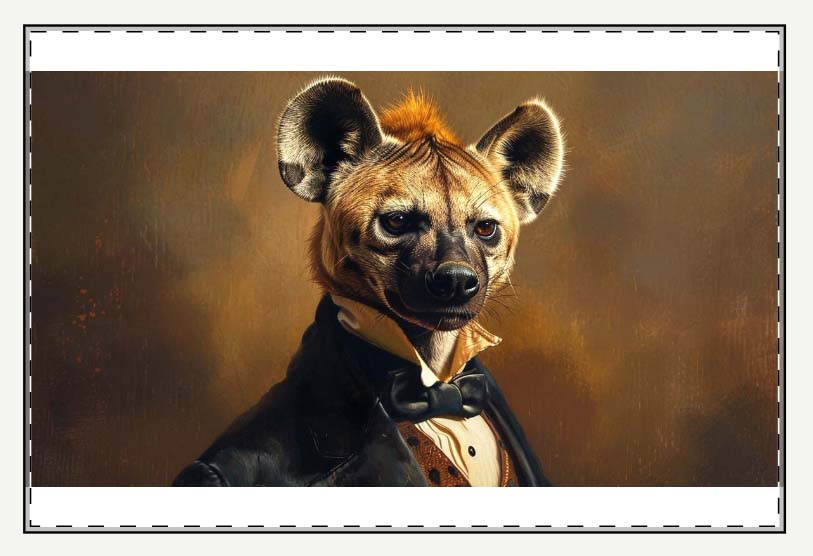
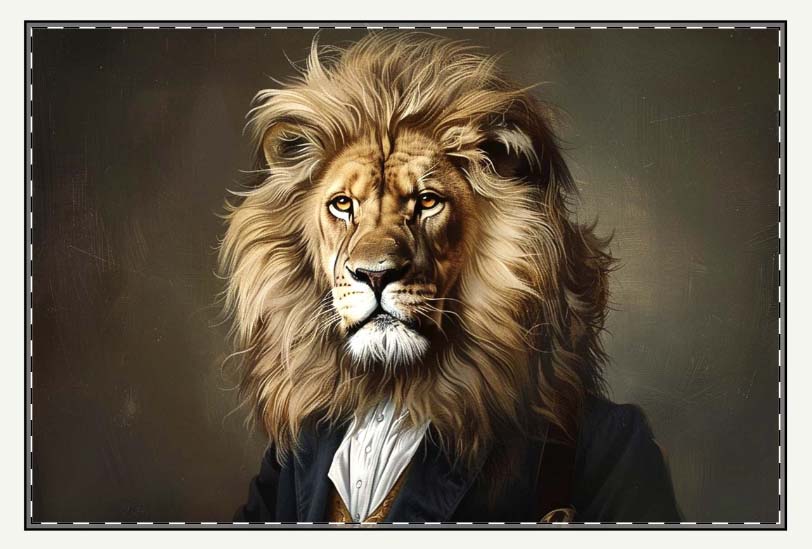
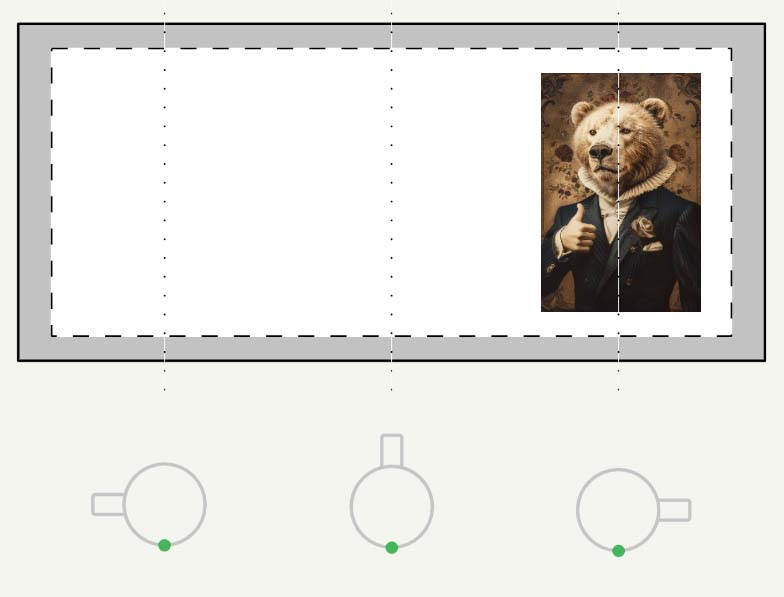
At the start of an operation, you select the artwork images you want turned into products. For each file, the tool will create a product and apply one placement rule so the art fits the print area(s) correctly across all variants. The available options are:
- Stretch to Fit Print Area(s)
- Preserve Image Aspect Ratios & Center
- Exactly Match Example Image(s)
Why this is useful for print-on-demand sellers
Most of the “time tax” in manual listing creation hides inside image handling. A standardized placement rule eliminates it:
- No pre-cropping marathons: You don’t have to pre-crop or export dozens of size variants in Photoshop. The software handles fitting across all sizes and orientations in one pass.
- No distortion where it matters: Text- and logo-heavy designs stay clean: “Preserve Aspect Ratio & Center” keeps geometry intact while maximizing coverage within the safe area.
- Effortless full-coverage catalogs: “Stretch to Fit” fills edge-to-edge across mixed aspect ratios (e.g., 18×24 and 20×30) without you nudging sliders per variant.
- Pixel-consistent complex products: “Exactly Match Example” mirrors a placement you’ve already perfected so every clone looks identical.
- Print-quality safeguarded: Built-in upscaling (when needed) helps you meet print quality thresholds without a separate image-prep workflow.
- Uniform previews at scale: One rule governs hundreds of items, so listings look on-brand—and you avoid the one-off placement errors that creep in when you do this by hand.
Step 2 — Connect your store & choose an Example Product

Next, you connect the tool to your POD platform using an API token. Think of an API token as a secure key that allows authorized software to perform specific actions on your behalf—uploading images, creating products, selecting variants, and updating titles/descriptions/tags. You can generate and revoke these tokens from your platform’s settings at any time.
Once connected, you select one Example Product. This is your “role model” product: the exact combination of product type, variants, pricing, and options you want the system to replicate. During the run, the tool clones that structure for each artwork image, swaps in the correct art according to your placement rule, and preserves your pricing and settings.
Why this is useful for print-on-demand sellers
- Configure once, scale everywhere: Set the ideal product a single time and apply it across an entire collection—no re-selecting sizes, materials, or defaults for every listing.
- Pricing discipline by default: Cloning your per-variant prices preserves margins and prevents accidental underpricing on outlier sizes.
- Template flexibility: Maintain multiple templates (posters, canvas, apparel, mugs, etc.) and switch strategies instantly by picking a different Example Product.
- Clear naming avoids mistakes: Labels like
POSTER_2x3_Matte_MidPriceorTEE_Unisex_ClassicFitmake the correct template obvious in a dropdown. - Faster Quality Assurance: When variants, defaults, and policies are consistent, issues stand out quickly and are trivial to correct.
Step 3 — Let AI handle titles, descriptions, and tags (one unified system)

This stage is where the automation feels like a superpower. The tool analyzes each artwork image with AI image recognition, then writes an SEO-optimized title, a natural 1–2 paragraph description, and a focused set of tags—all automatically, one product after another. The image analysis identifies subject matter, style, palette, composition cues, and mood; the text generator then turns those findings into human-readable, keyword-rich copy that aligns with how shoppers search.
The result is consistent, accurate product information at scale—without you sitting there trying to invent new adjectives for the hundredth time.

How AI image recognition helps, in plain terms
- It “sees” what’s in the image (e.g., mountains, moons, city skylines, animal portraits) and describes it the way a careful human would.
- It captures style and context (e.g., minimalist line art, gallery photography, vintage travel poster, brutalist geometry).
- It surfaces long-tail phrasing that aligns with real queries (e.g., “black and white architectural print”, “whimsical nursery wall art”, “neon cyberpunk skyline”).
- It produces unique copy per image, which reduces internal cannibalization between your own listings.

Examples of SEO-Optimized POD Products Created By This Tool:
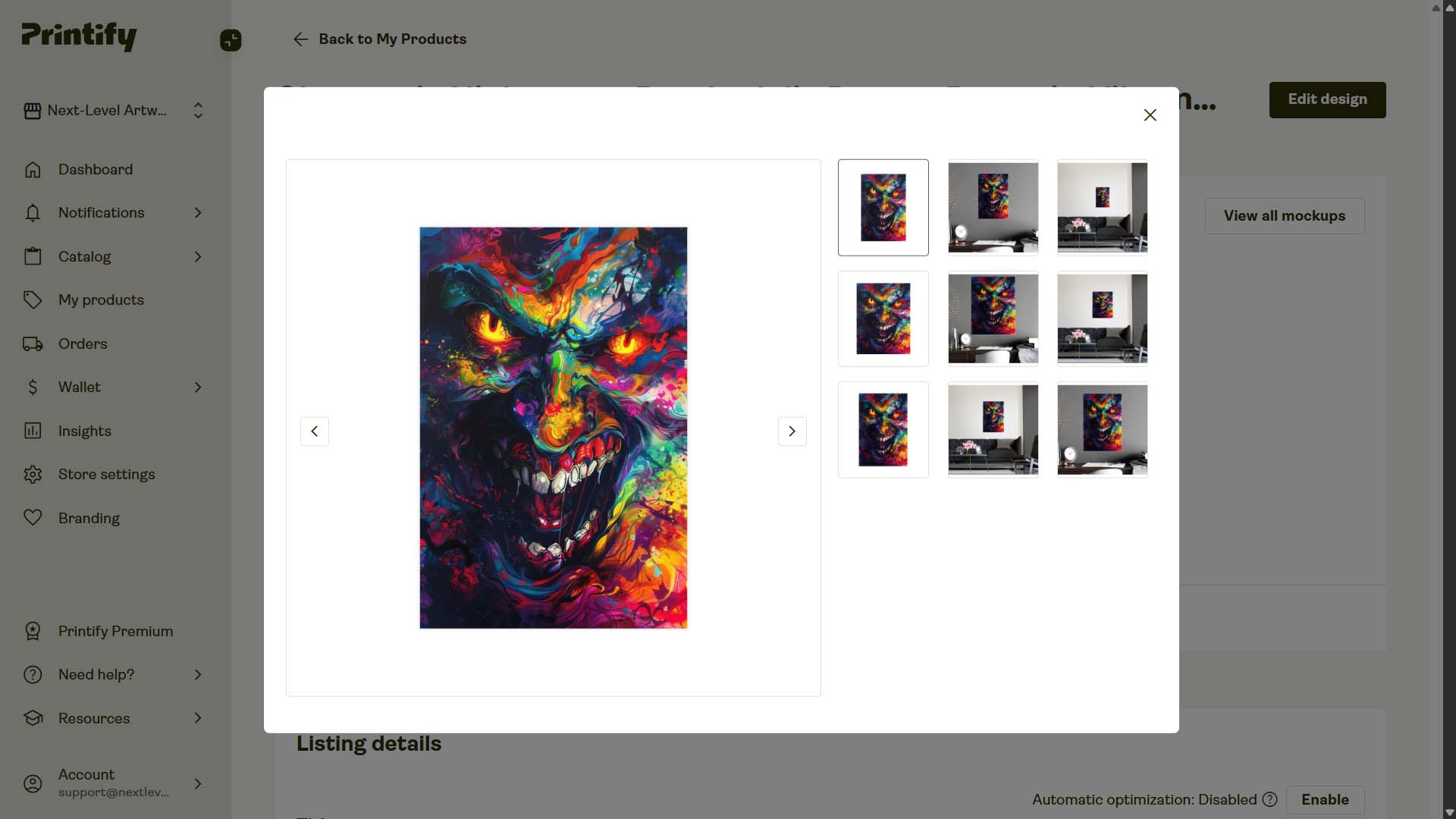
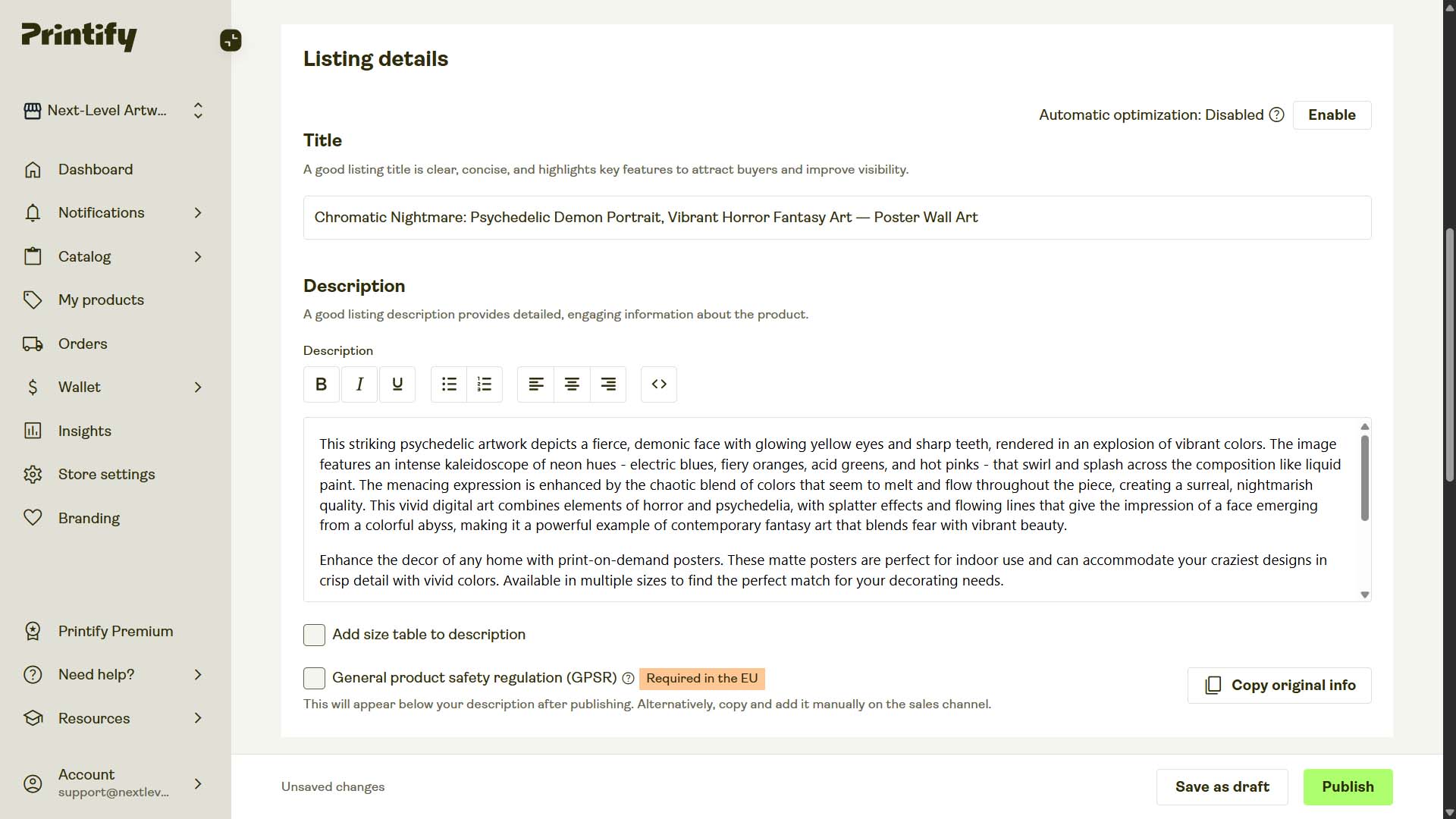
Example Product #1:
- AI-Generated Title: "Chromatic Nightmare: Psychedelic Demon Portrait, Vibrant Horror Fantasy Art"
- AI-Generated Description: "This striking psychedelic artwork depicts a fierce, demonic face with glowing yellow eyes and sharp teeth, rendered in an explosion of vibrant colors. The image features an intense kaleidoscope of neon hues - electric blues, fiery oranges, acid greens, and hot pinks - that swirl and splash across the composition like liquid paint. The menacing expression is enhanced by the chaotic blend of colors that seem to melt and flow throughout the piece, creating a surreal, nightmarish quality. This vivid digital art combines elements of horror and psychedelia, with splatter effects and flowing lines that give the impression of a face emerging from a colorful abyss, making it a powerful example of contemporary fantasy art that blends fear with vibrant beauty."
- AI-Generated Tags: "psychedelic artwork, dark horror artwork, neon demon illustration, surreal fantasy art, trippy horror painting, abstract psychedelic face, colorful nightmare art, vibrant surrealism, contemporary fantasy horror, chaotic psychedelic design"
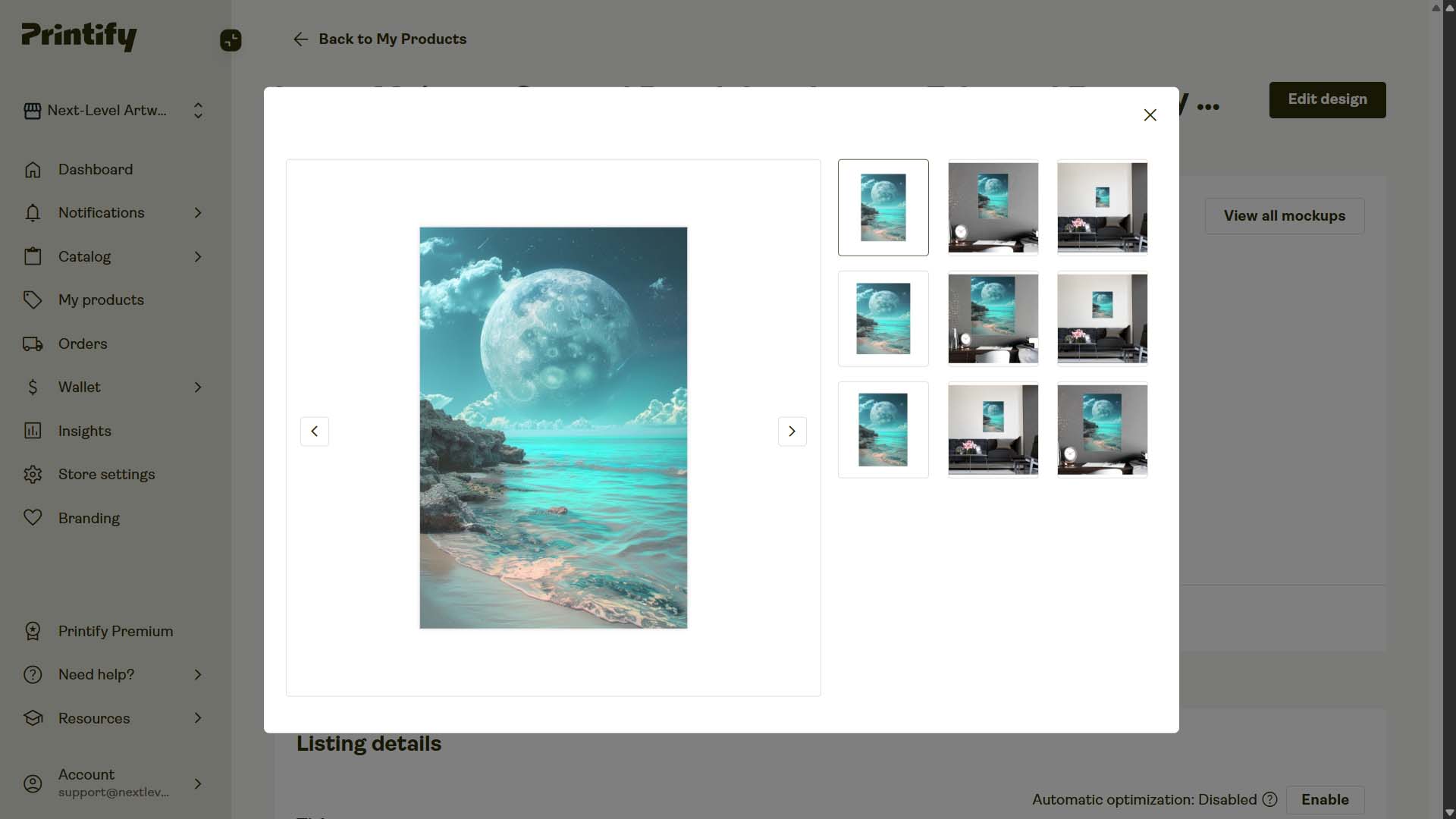
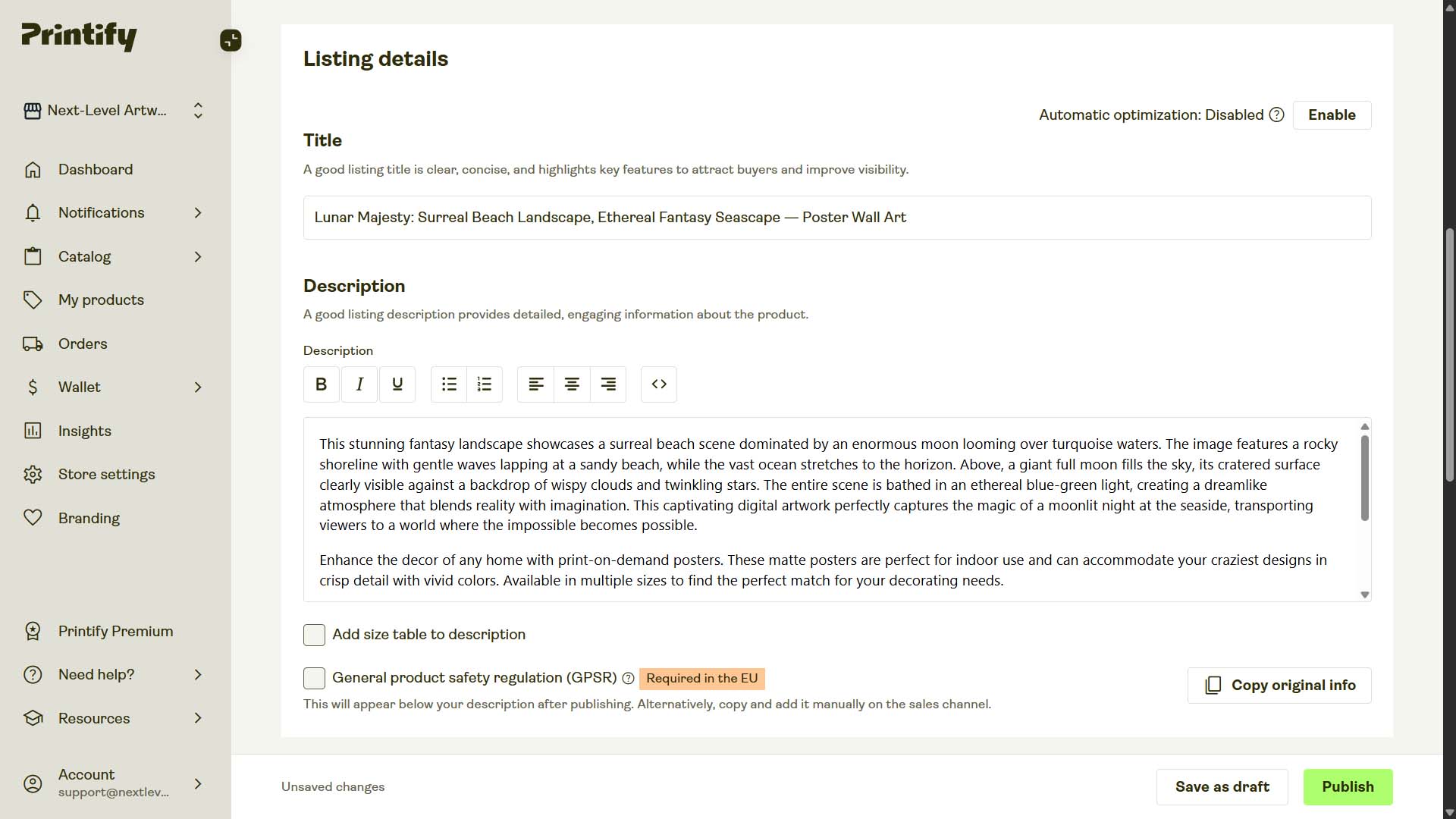
Example Product #2:
- AI-Generated Title: "Lunar Majesty: Surreal Beach Landscape, Ethereal Fantasy Seascape"
- AI-Generated Description: "This stunning fantasy landscape showcases a surreal beach scene dominated by an enormous moon looming over turquoise waters. The image features a rocky shoreline with gentle waves lapping at a sandy beach, while the vast ocean stretches to the horizon. Above, a giant full moon fills the sky, its cratered surface clearly visible against a backdrop of wispy clouds and twinkling stars. The entire scene is bathed in an ethereal blue-green light, creating a dreamlike atmosphere that blends reality with imagination. This captivating digital artwork perfectly captures the magic of a moonlit night at the seaside, transporting viewers to a world where the impossible becomes possible."
- AI-Generated Tags: "fantasy seaside artwork, turquoise ocean landscape, dreamlike moonlit beach, surreal giant moon scene, cosmic coastal painting, ethereal night sky art, ocean horizon fantasy, magical moonlight artwork, surreal beach scenery, imaginative seascape art"
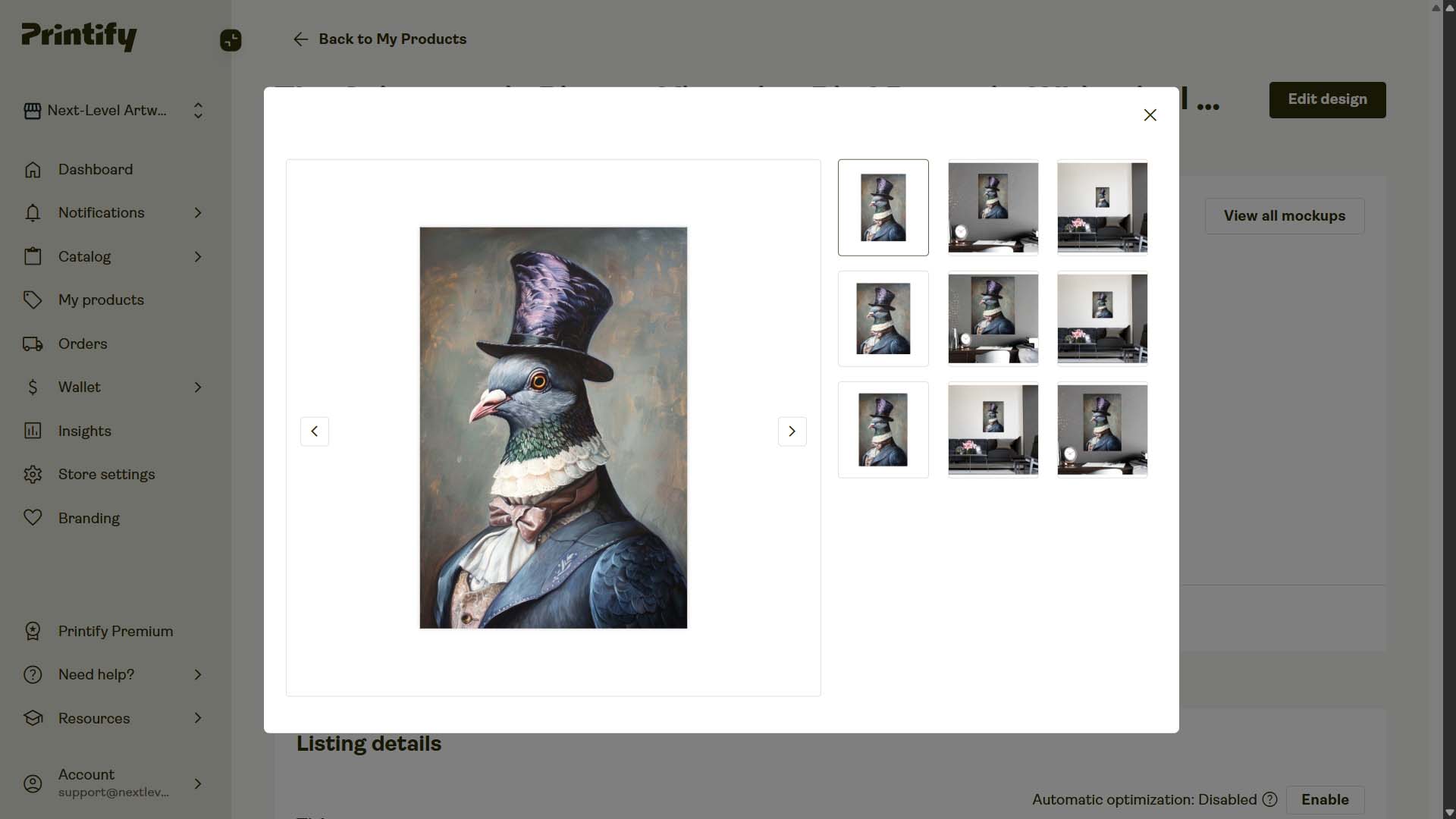
Example Product #3:
- AI-Generated Title: "The Aristocratic Pigeon: Victorian Bird Portrait, Whimsical Animal Art"
- AI-Generated Description: "This whimsical portrait depicts a regal pigeon dressed in aristocratic Victorian attire. The bird sports a tall, purple top hat with intricate feather-like patterns, adding height and sophistication to its appearance. Its piercing orange eye gazes directly at the viewer, creating an engaging focal point. The pigeon's neck is adorned with a delicate white lace collar and a large, dusty pink bow tie, emphasizing its refined status. A blue-gray coat with subtle embellishments drapes over its shoulders, complementing the pigeon's natural plumage. The bird's iridescent green and purple neck feathers shimmer, creating a natural necklace effect. The portrait's background features muted, warm tones that enhance the subject's prominence. This anthropomorphic artwork blends realism with fantasy, showcasing impeccable attention to detail in both the bird's natural features and its opulent clothing. The overall effect is a captivating and humorous take on traditional portrait painting, elevating a common city bird to noble status."
- AI-Generated Tags: "anthropomorphic bird painting, whimsical pigeon portrait, victorian animal artwork, aristocratic bird design, humorous fantasy portrait, regal pigeon illustration, surreal animal character, noble bird artwork, top hat pigeon art, fantasy creature portrait"
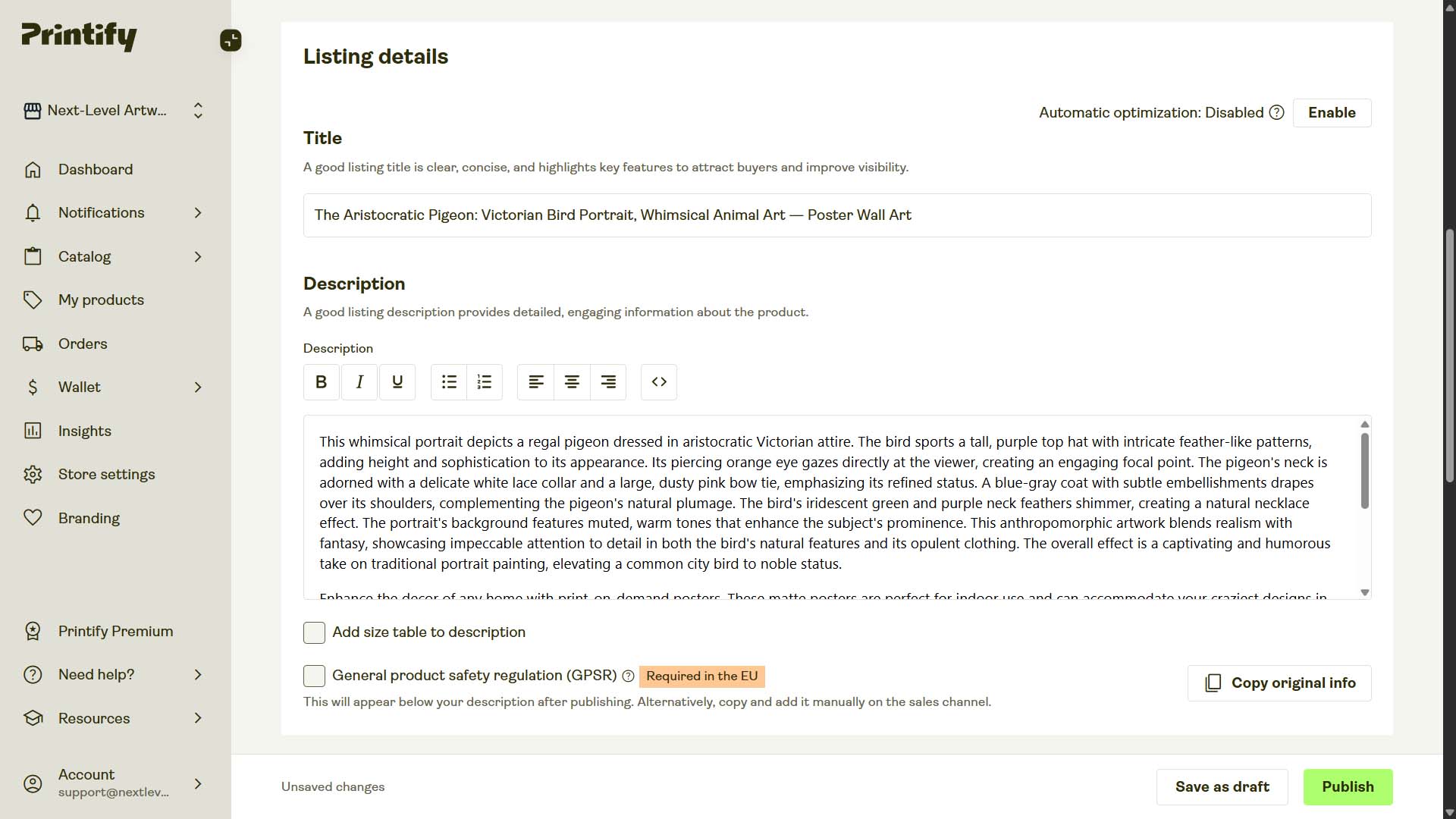
Optional customization: title text, description HTML, and custom tags
AI gives you accurate, varied language; your rules add brand and catalog structure. Three simple controls cover most needs:
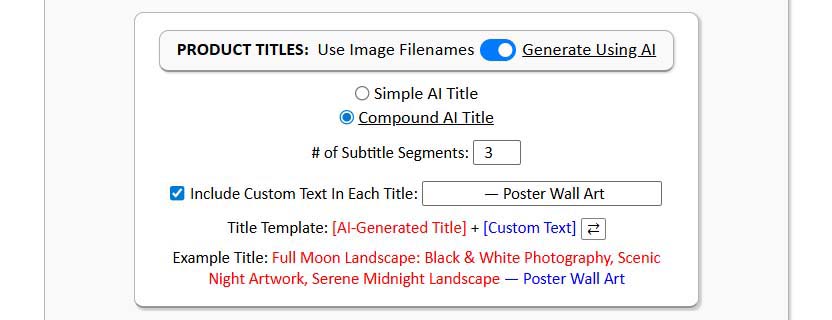
Title text (prefix or suffix).
Add standardized product nouns to every title, either at the front or the end:
- Prefix example:
Poster Wall Art: Sunlit Fern Silhouette - Suffix example:
Sunlit Fern Silhouette — Poster Wall Art
Either format helps align with buyer phrasing (“poster wall art”, “gallery canvas”, “unisex graphic tee”) and improves click-through by signaling the product type immediately.
Description HTML block (appended or prepended).
Keep your artwork-specific paragraph(s) from AI, then insert a reusable HTML section that lists materials, finish, sizes, care, and any store policies you want visible. This delivers two wins: consistent factual info for buyers, and a stable layer of product-level keywords for search engines.

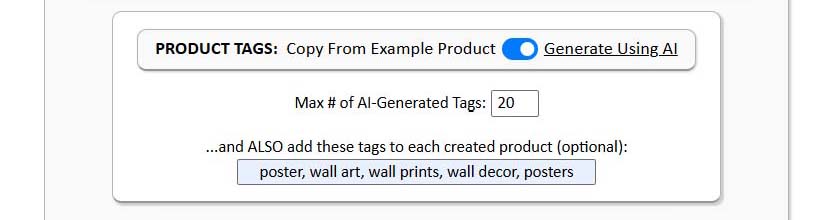
Custom tags (added to AI tags).
Let AI propose artwork-specific tags. Then append your own shop conventions—product-level tags (e.g., “gallery canvas”, “framed print”, “graphic tee”) and collection tags (e.g., “coastal photography”, “mid-century abstracts”, “cyberpunk night scenes”). This keeps discovery and collection rules tidy across the store.
Why this matters for POD sellers (the real-world payoff)
You stop wasting time on the hardest part to scale.
Hand-writing titles, descriptions, and tags is where most listings stall. AI eliminates that bottleneck without dropping quality.
You avoid repetition and internal competition.
Humans repeat themselves; the model doesn’t get bored. More varied, accurate language means listings overlap less and capture more unique searches.
You protect quality at volume.
The first listing and the five-hundredth listing are equally detailed and consistent—no “last-mile fatigue” where copy gets rushed or corners get cut.
You still control the brand layer.
Prefixes/suffixes, description HTML, and custom tags ensure your store’s taxonomy and voice stay coherent.
You get better matching to high-intent queries.
When titles and descriptions naturally include the phrasing buyers use, click-through rises. Higher engagement is a positive signal for marketplace ranking.

Additional upsides of a POD automation tool (beyond what we’ve covered)
Standardization reduces errors.
Consistent variants, defaults, and prices minimize the chances of mismatched materials, missing sizes, or accidental underpricing. That protects margins and customer experience.
Bigger catalogs, faster.
The same number of work hours now produces far more listings, giving you more search entry points and a broader long-tail footprint.
Fewer staffing overheads.
You don’t need to hire and manage assistants for repetitive listing tasks. The automation handles volume work while you focus on higher-value activities.
Time reallocated to revenue drivers.
Energy goes into design quality, storefront polish, marketing, and partnerships—the work that actually moves sales, not the mechanics of listing creation.

Wrap-up
Automation is the simplest way to uncap your growth in print-on-demand. By letting the Bulk POD Product Creator handle image placement, product cloning, and AI-generated titles, descriptions, and tags, you publish more listings with tighter consistency and far less effort. More output, fewer errors, and more of your week reserved for the creative and strategic work that grows revenue. This print-on-demand automation tool will save you tons of time by doing the boring work for you.